How to Transfer Emails from QQ Mail to Gmail Account?

Switching email services is common today, especially when users move countries, change jobs, or need better security and accessibility. If you are using QQ Mail and want to move your emails to Gmail, this guide is written exactly for you. This article explains two practical methods to transfer emails from QQ Mail to Gmail. One is a manual approach, and another is a professional automated solution, so you can choose what works best for your needs.
Why Gmail Is a Better Choice Than QQ Mail?
Users don’t migrate emails without a strong reason. Here’s why Gmail is preferred:
- Easy interface that works well for both beginners and professionals
- Advanced email search to quickly find old messages
- Global accessibility from any device or location
- Strong security with two-step verification and spam protection
- Google ecosystem access (Drive, Docs, Meet, Sheets)
- 15 GB free storage, much more than many webmail services
Because of these advantages, users often want all their QQ Mail data moved safely into Gmail.
Two Ways to Move Emails from QQ Mail to Gmail
There are two reliable ways to transfer QQ Mail emails:
- Manual POP method (Suitable for small inboxes)
- Automated (Recommended for large mailboxes)
Let’s explore both.
Method 1. How to Add QQ Mail to Gmail Manually?
To manually import QQ.com email into Gmail follow the steps-
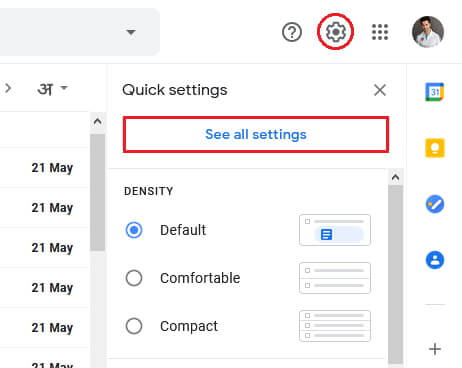
Step 1. Open your Gmail account. Go to Settings and click on the See All Settings option.
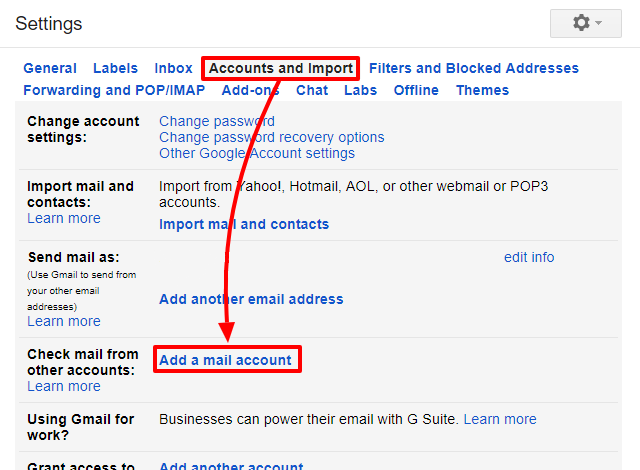
Step 2. After that, click on Accounts and Import and select Add a mail account option.
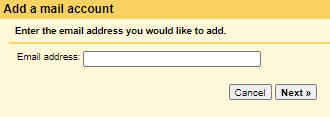
Step 3. Enter the Email Id of your QQ Mail and click on Next button.
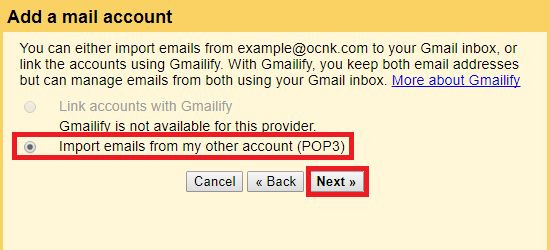
Step 4. Now, Select Import emails from my other email account(POP3) and hit on Next.
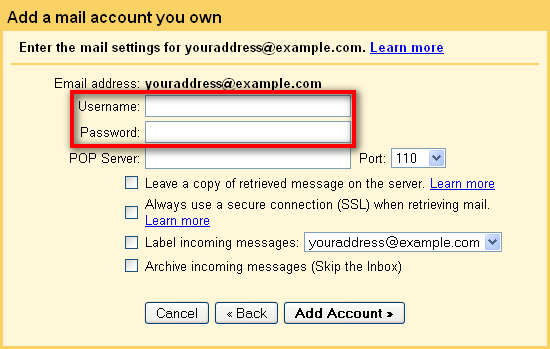
Step 5. After that, fill in Username- your email address, Password- QQ Mail account Password, POP Server- pop.qq.com, and Port Number-995 in the respective field.
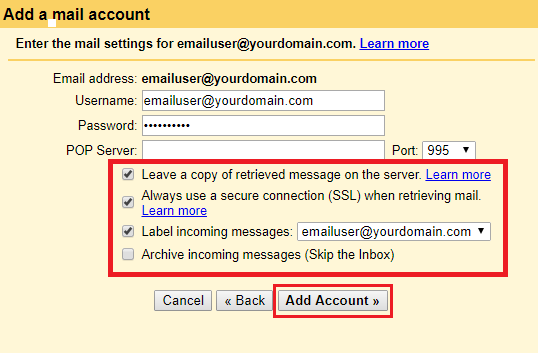
Step 6. Now, Check the box and then click on Add Account.
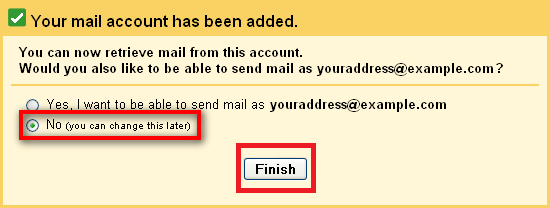
Step 7. At last, click on the Finish button to start QQ Mail to Gmail migration.
Hence, you can add QQ Mail to Gmail and transfer email from QQ Mail to Gmail manually.
Method 2. How to Migrate QQ Mail Emails to Gmail Account?
Try Xtraxtor Email Migration Tool, which is the most reliable and trusted method available to migrate QQ Mail data to Gmail account. This application has been developed while keeping the requirements of all types of users. It is an amazing application to directly migrate QQ.com to Gmail account.
The software has many advanced features that make it unique. With this tool, you can import QQ Mail emails into Gmail with attachments. The tool allows you to move the entire mailbox from QQ Mail to Gmail at once. Also, you can choose the selective mailbox to transfer emails from QQ Mail to Gmail.
Apart from this, it does not matter whether you are a technical user or not. You can easily perform the QQ Mail to Gmail migration process without any issues. You can run this utility on any Windows-based system.
Try the demo version and check how it works so easily and accurately.

Steps to Transfer Emails from QQ Mail to Gmail
Step 1. Launch Xtraxtor software on your Windows system.
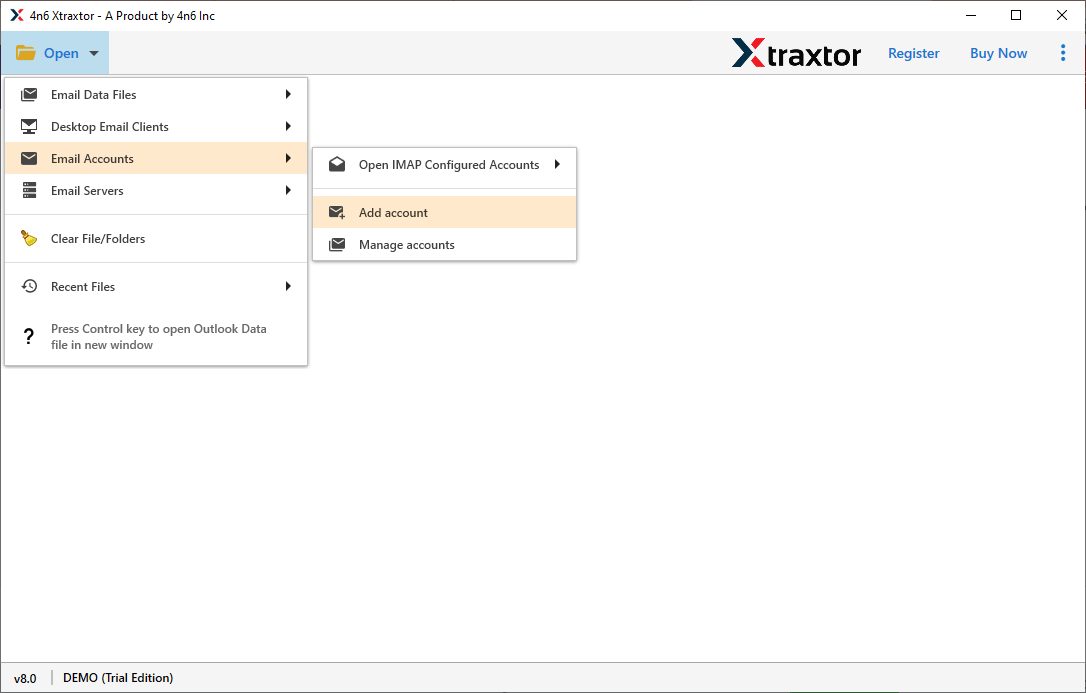
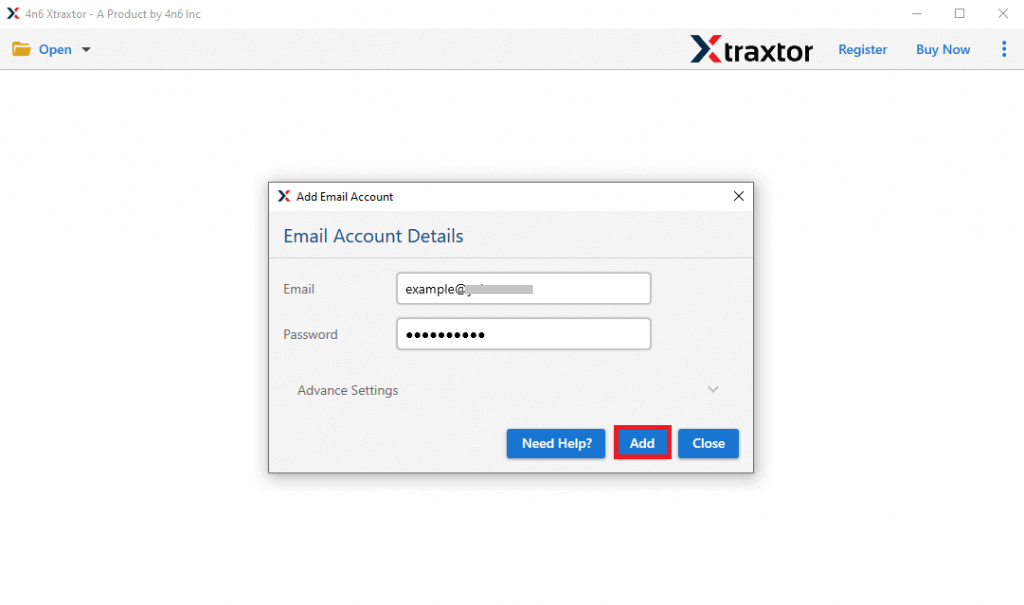
Step 2. Now, navigate to Open >> Email Accounts >> Add Account.
Step 3. Enter the Email Id and password of your QQ Mail account and then click on Add button.
Note: Use App Password to add accounts.
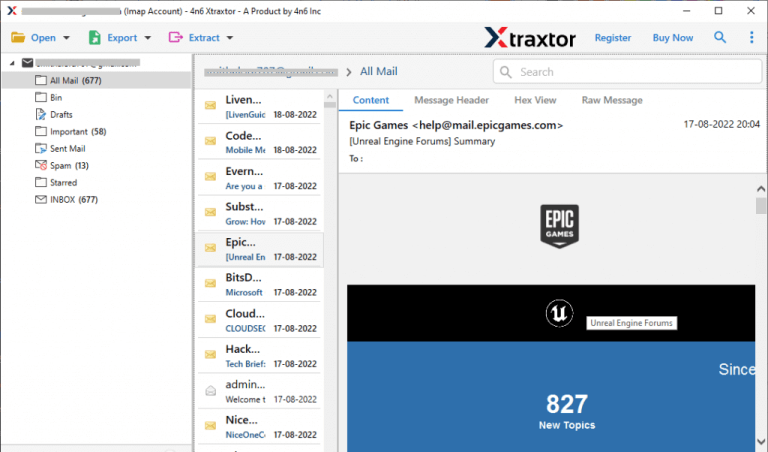
Step 4. Here, you can view QQ.com emails before the migration.
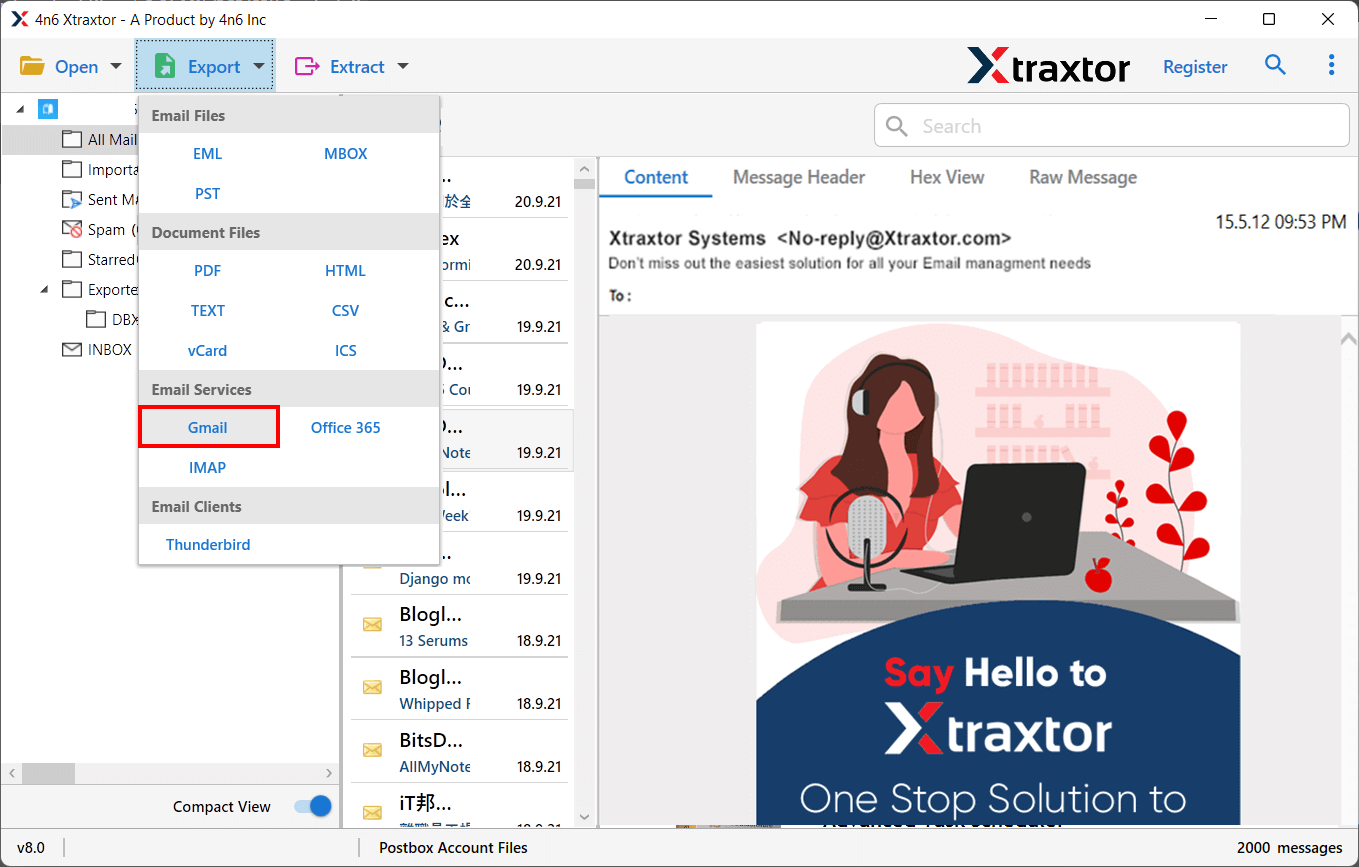
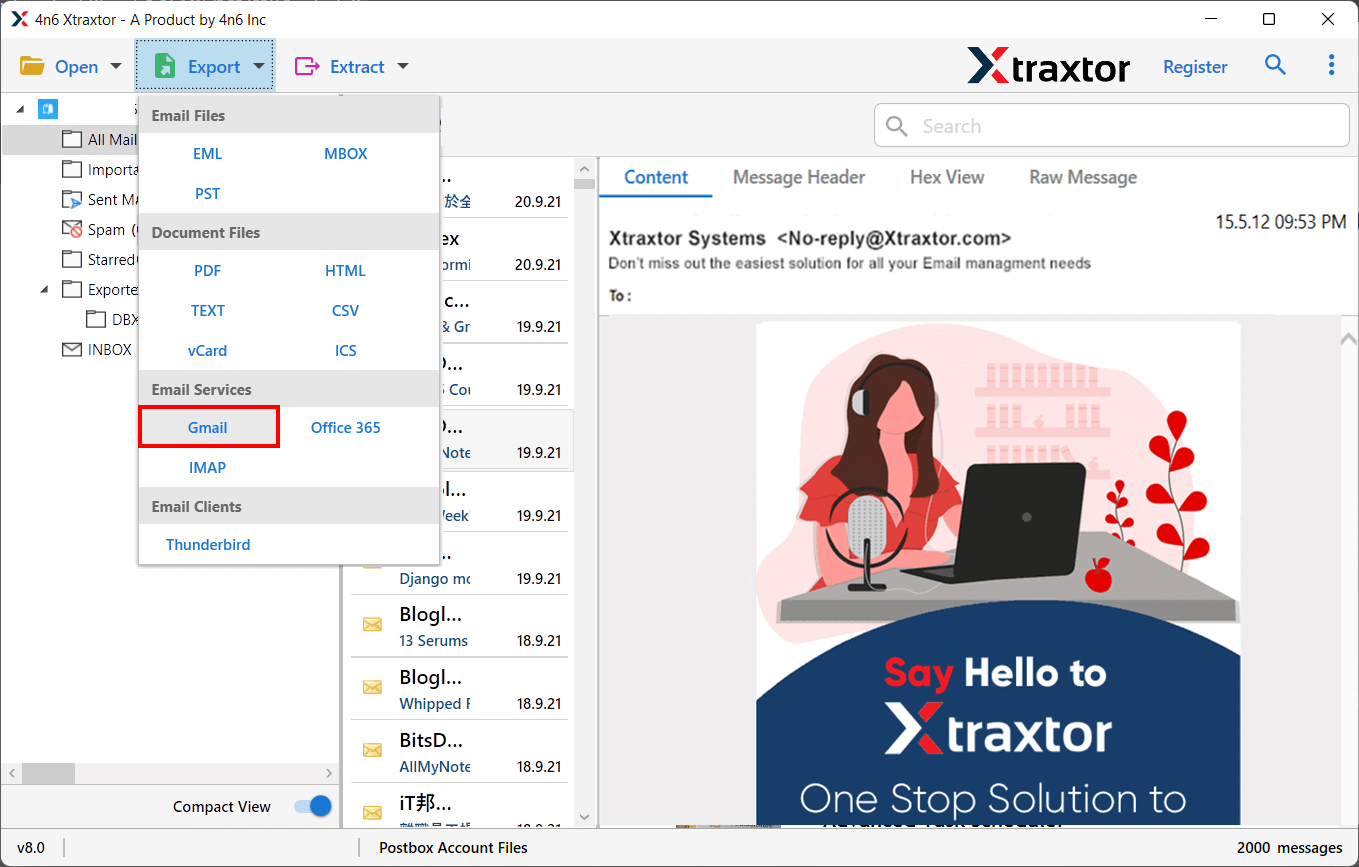
Step 5. After that, Click on Export and select Gmail from the given Email services list.
Step 6. Select the email folders & subfolders that you want to add QQ Mail to Gmail.
Step 7. Apply the filter option to migrate selected emails from QQ Mail to Gmail.
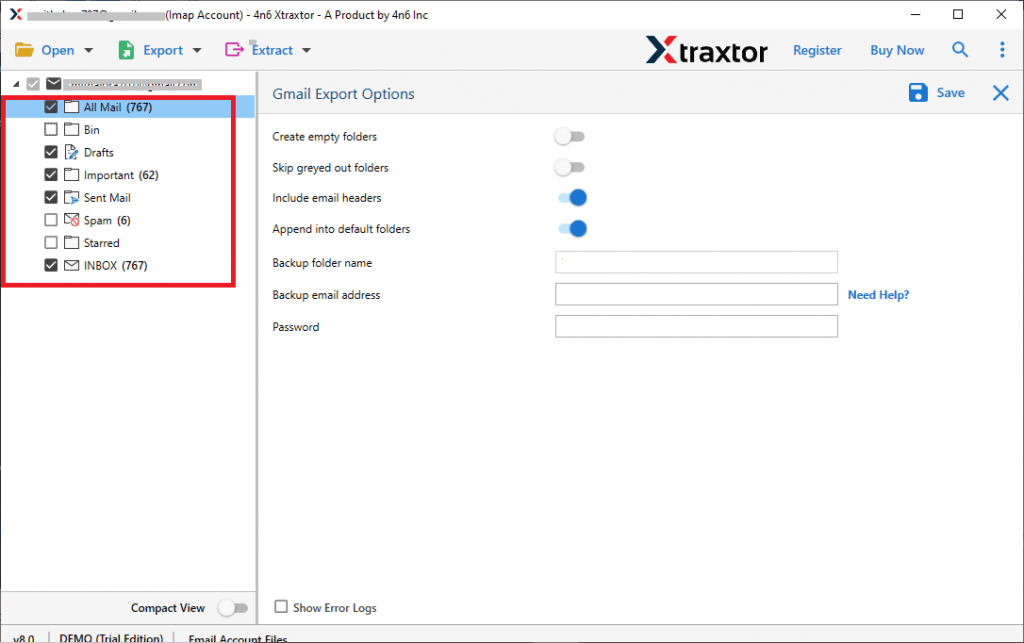
Step 8. Enter the Gmail account credentials and then click on the Save button.
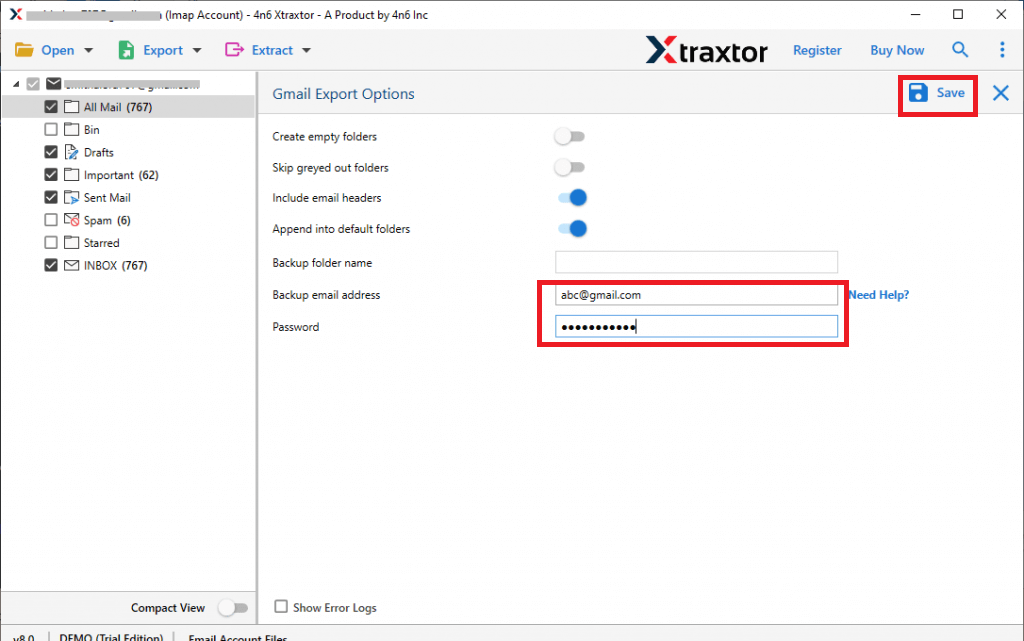
Done! You can now easily transfer emails from QQ Mail to Gmail in just a few simple clicks. No technical guidance is needed, and there’s no risk of data loss with this smart tool.
Why Choose Xtraxtor QQ Mail to Gmail Migration Tool over Manual Solution?
There are many reasons to choose this email migrator. Some of them are given below-
- Bulk QQ Mail to Gmail Migration- The software support bulk migration which enables you to transfer multiple emails or folders from QQ Mail to Gmail. This feature saves time and effort to migrate the entire mailbox. While the manual solution does not permit you to add QQ Mail to Gmail in bulk.
- Advanced Filter Options- The software has many advanced filter options such as to, from, date, time, subject, etc. If you do not want to move all emails from QQ Mail to Gmail account then filters help you. On the other hand, the manual solution has no email filter option for selective migration.
- Secure Interface- It offers a secure interface that ensures the privacy of your data during the migration process. It does not save your email account credentials. The software preserves 100% data integrity and migrates QQ Mail emails with all key attributes and components. While in the manual solution, there is no guarantee about the data security. Users must follow each step very carefully in manual method otherwise data may be loss.
- Maintain Folder Hierarchy- The tool preserves the folder structure while transferring data from QQ.com to Gmail account. It imports QQ Mail email into Gmail in its original format without losing any single bit of data.
- Preview Mode- When you add your account the software automatically loads all data from your account to the software panel. Here, you can view and select the emails before transferring them. On the other hand, the manual solution does not provide a preview option.
- Export Complete Mailbox- Using this software, you can import complete mailboxes from QQ Mail to Gmail. While you manually transfer only emails.
- Easy to Use- The interface of this utility is very simple. Users do not need in-depth technical knowledge to perform the QQ Mail to Gmail Migration. Whereas, in the manual approach users must have the technical knowledge to add QQ Mail to Gmail account.

Final Words
In this post, we have discussed how to transfer emails from QQ Mail to Gmail account. You manually move QQ.com to Gmail but there are some limitations to this method. However, experts recommend using the automated solution to add QQ Mail to Gmail without any hassle. Using the above-suggested tool, you can directly migrate QQ Mail to Gmail in a few simple clicks without losing a single bit of data.
