How to Transfer Emails from Roundcube to Gmail?

Are you planning to move from Roundcube to Gmail and worried about losing important emails? Don’t worry—migrating your emails is safe and simple when done the right way. In this guide, we will show you how to transfer emails from Roundcube to Gmail without data loss.
Roundcube is a popular webmail service used by many hosting providers. It offers a clean interface, basic email management, and easy access through a web browser. However, Roundcube has limited storage and fewer advanced features.
Because of this, many users prefer Gmail for its larger storage, powerful search, strong spam protection, and seamless integration with Google services.
Why Transfer Emails from Roundcube to Gmail?
Roundcube is a basic webmail client that depends on your hosting server. While it works for simple needs, it lacks modern features and updates. Gmail, on the other hand, is a powerful cloud-based email service.
Users usually export Roundcube emails to Gmail because Gmail offers:
- Access from anywhere (browser, mobile, desktop)
- Faster performance and better uptime
- Advanced spam and phishing protection
- Easy email search and smart filters
- Seamless integration with Google Drive and Calendar
- Large free storage for long-term email access
If you want a more reliable and future-ready email platform, Gmail is a strong upgrade.
How to Export Emails from Roundcube to Gmail Directly?
Xtraxtor Email Backup Tool is a secure and efficient way to transfer Roundcube emails to Gmail without any hassle. The software is specially designed with advanced algorithms and a simple interface that helps beginners to migrate email from Roundcube to Gmail without any complications.
You can download the free demo version of this tool to check its work efficiency.
Steps to Transfer Roundcube Emails to Gmail
Step 1. Launch Xtraxtor on your Windows PC.
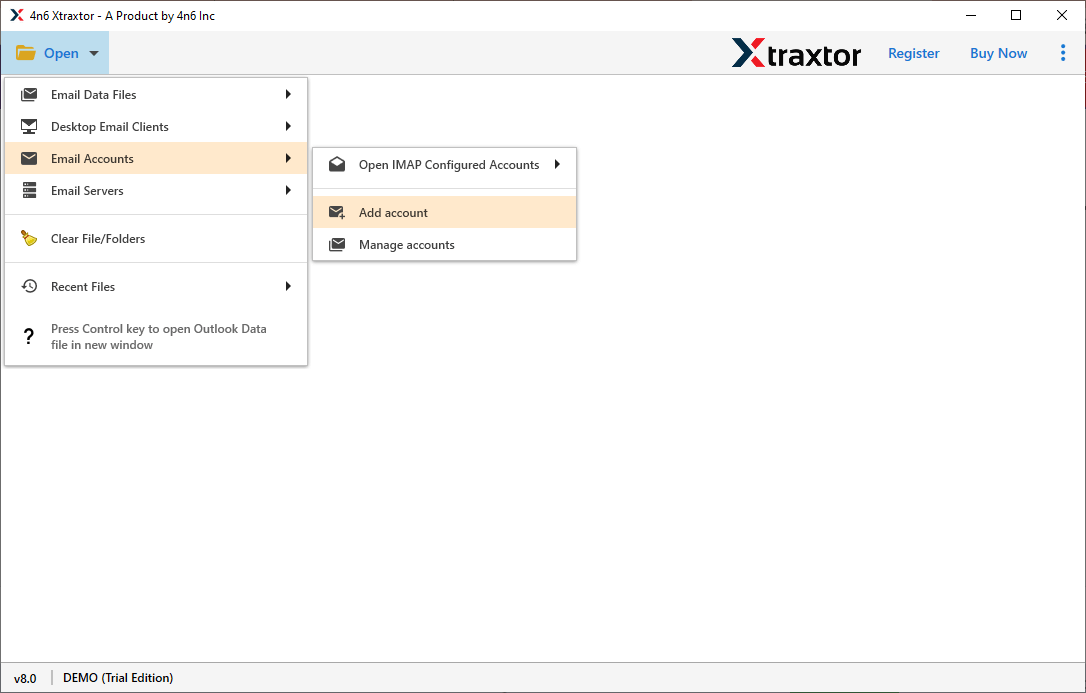
Step 2. Now, click on Open >> Email Accounts >> Add Account.
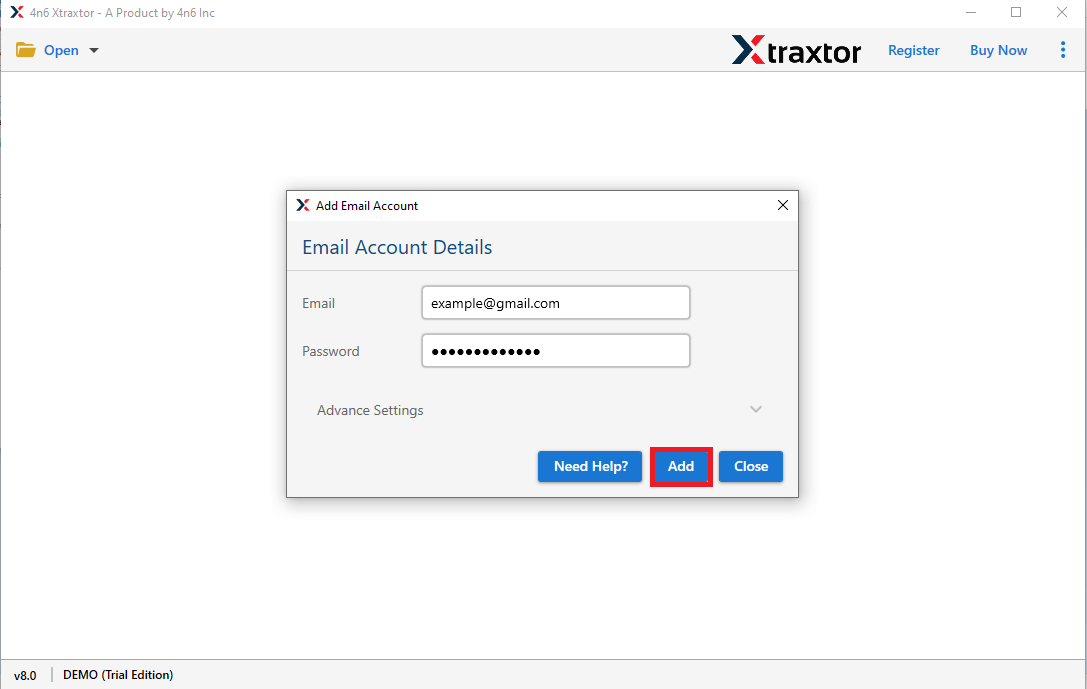
Step 3. Enter your Roundcube credentials and click on Add button.
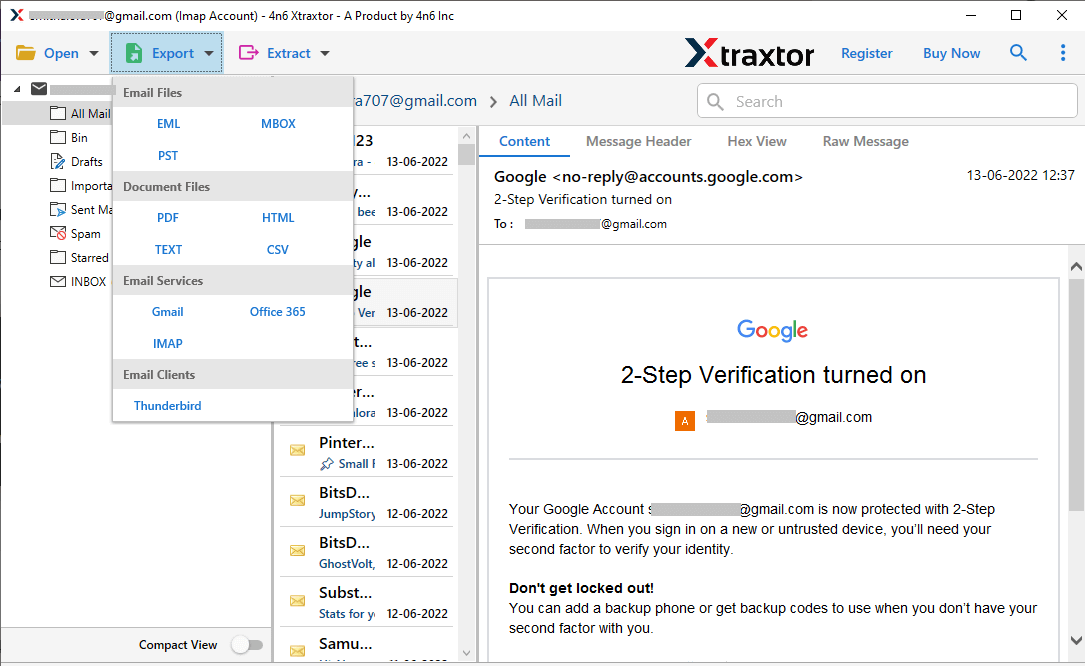
Step 4. After that, click on Export and Select Gmail from the Email Services option.
Step 5. At last, click on Save button to save the resultant file.
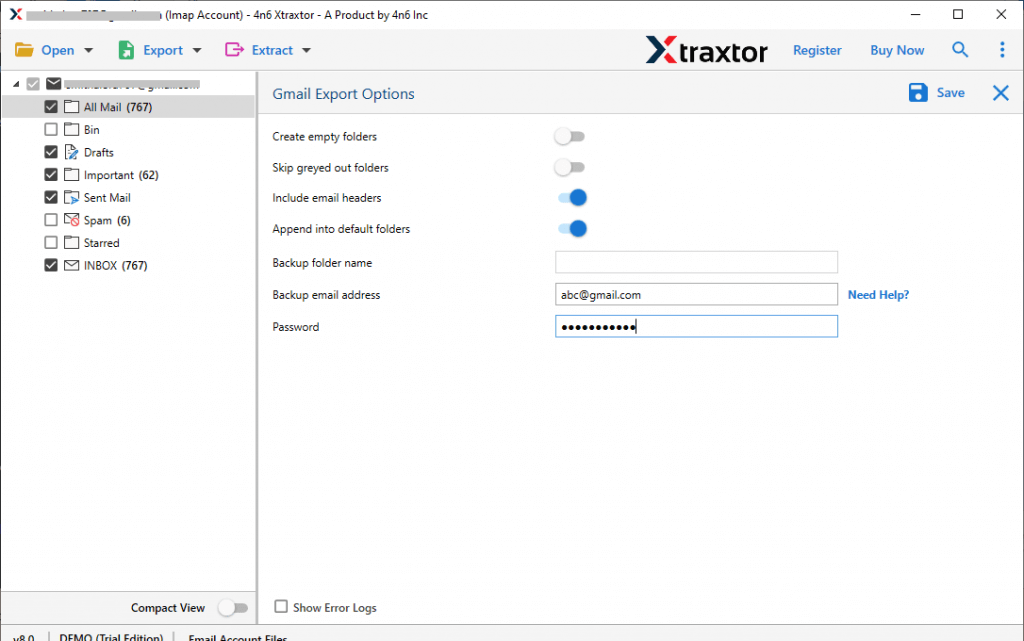
The process is done! Hence, you export Roundcube emails to Gmail in a few simple clicks. Now, open your Gmail account and check the exported emails.
Why Use Xtraxtor?
The software has many benefits that help you to easily migrate emails from Roundcube to Gmail, which are given below-
- Directly Migrate Email from Roundcube to Gmail Account- The Email Backup Tool directly transfers emails from one webmail account to another. You just need to add your Webmail account and select the saving option. With the help of this tool, you can export all Roundcube emails.
- Bulk Export- The software easily downloads emails from Roundcube in a few simple clicks. It is able to export all Roundcube emails to Gmail at the same time without losing any data.
- Advanced Filter Options- This Email Backup Tool provides various advanced filter options, such as to, from, date, time, subject, etc. If you do not want to export unnecessary emails from Roundcube then filters help you to select desired data.
- Export into Various File Formats- The tool offers various saving options to save exported data. You can export Roundcube to PST, OST, PDF, MBOX, EML, MSG, etc. It allows you to secure your mailbox data in a local storage device.
- Preserves Data Integrity and Original Structure- The software maintains metadata properties and attributes of the emails and transfers Roundcube emails without modifying the structure and formats of the emails. It also preserves data integrity and gives accurate results after the process.
- Save Emails from multiple Webmail Accounts- This is an all-in-one solution to save emails from any Webmail accounts. Using this tool, you can take Gmail backup along with Yahoo, Google Workspace, Zoho Mail, etc.
- Easy to Use- The interface of this tool is very simple and easy to use. Both technical and non-technical users can migrate email from Roundcube to Gmail without any external guidance.
- Dedicated Customer Service- The best thing about this tool is that the customer service team is available 24/7 to answer users’ questions. If you have any doubts related to the product, then you can contact the support team. They solve your problem as soon as possible.
Conclusion
There are a lot of users who want to export Roundcube emails to Gmail. So, in this post, we have discussed reliable techniques to migrate emails from Roundcube to Gmail. However, the above-mentioned tool easily transfers all emails at once with accuracy. Download the demo version to check the work efficiency and accuracy of the software.
