How to Save Attachments from Yahoo Mail in Bulk?

Are you also facing problems downloading attachments from Yahoo Mail? If yes, this guide will help you. Here, you will learn all possible ways to save attachments from Yahoo Mail, understand its limitations, fix common download problems, and choose the best method based on your needs.
So, read this blog till the end to understand the issue and solution to solve your query easily.
Understanding How Attachments Work in Yahoo Mail
Before downloading attachments, it’s important to understand how Yahoo Mail handles them.
Yahoo Mail is a web-based email service, which means:
- Attachments are stored on Yahoo’s servers, not on your device.
- Downloads happen one file at a time in most cases.
- There is no built-in option to download attachments from multiple emails at once.
Because of these restrictions, many users face difficulties when they try to save attachments from Yahoo Mail in bulk.
Key Yahoo Mail Attachment Limitations
- No bulk “Download All Attachments” option across emails
- Large mailboxes slow down manual downloading
- Browser-based restrictions affect downloads
- Attachment size and security rules apply
Because of these limits, users often look for better ways to save attachments efficiently.
Now, we are going to understand the complete methods to download attachments from Yahoo Mail. Go through each method one by one and then select the best as per your need and requirement.
How to Save Attachments from Yahoo Mail One by One?
This is the manual method and works best if you have only a few emails.
Follow the steps below to get attachments from Yahoo Mail by using its built-in option.
- Log in to your Yahoo Mail account.
- Open the email that contains the attachment.
- Click the Download icon next to the attachment.
- Choose a location on your computer to save the file.
Done! Now, follow the same steps for the rest of the remaining emails.
If you have a few emails, then this method is most suitable for you. However, if you are in a hurry and want to download all attachments from Yahoo Mail, then you can try an alternate approach explained below.
How to Download Attachments from Multiple Emails in Yahoo Mail Professionally?
If you have hundreds or thousands of emails, the manual method is not practical. Yahoo Mail does not allow downloading attachments from multiple emails at once. This is where a professional attachment extraction solution becomes helpful. Xtraxtor Yahoo Mail Attachment Extractor is one such tool that can let you download all attachments from Yahoo Mail in a single attempt. No matter how many emails are in your Yahoo Mail account or how large the attachments are, this single tool handles all the requirements easily.
So, what are you waiting for? Click on the free download button and give this tool a free try to this tool;

Steps to Save Attachments from Yahoo Mail Account
Step 1. Run the Xtraxtor Software on your Windows PC.
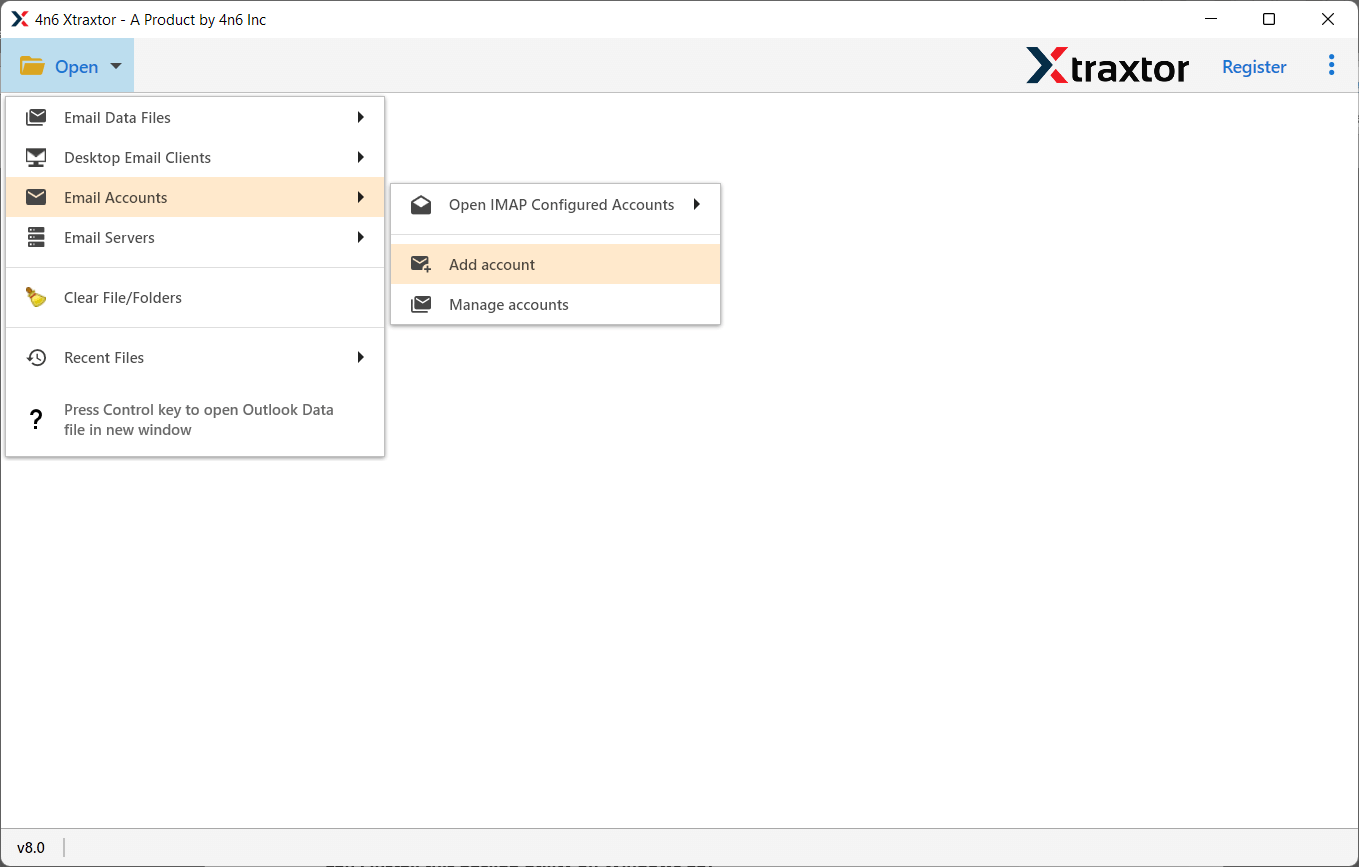
Step 2. Next, click on the Open tab, then Email Accounts, and choose Add Account.
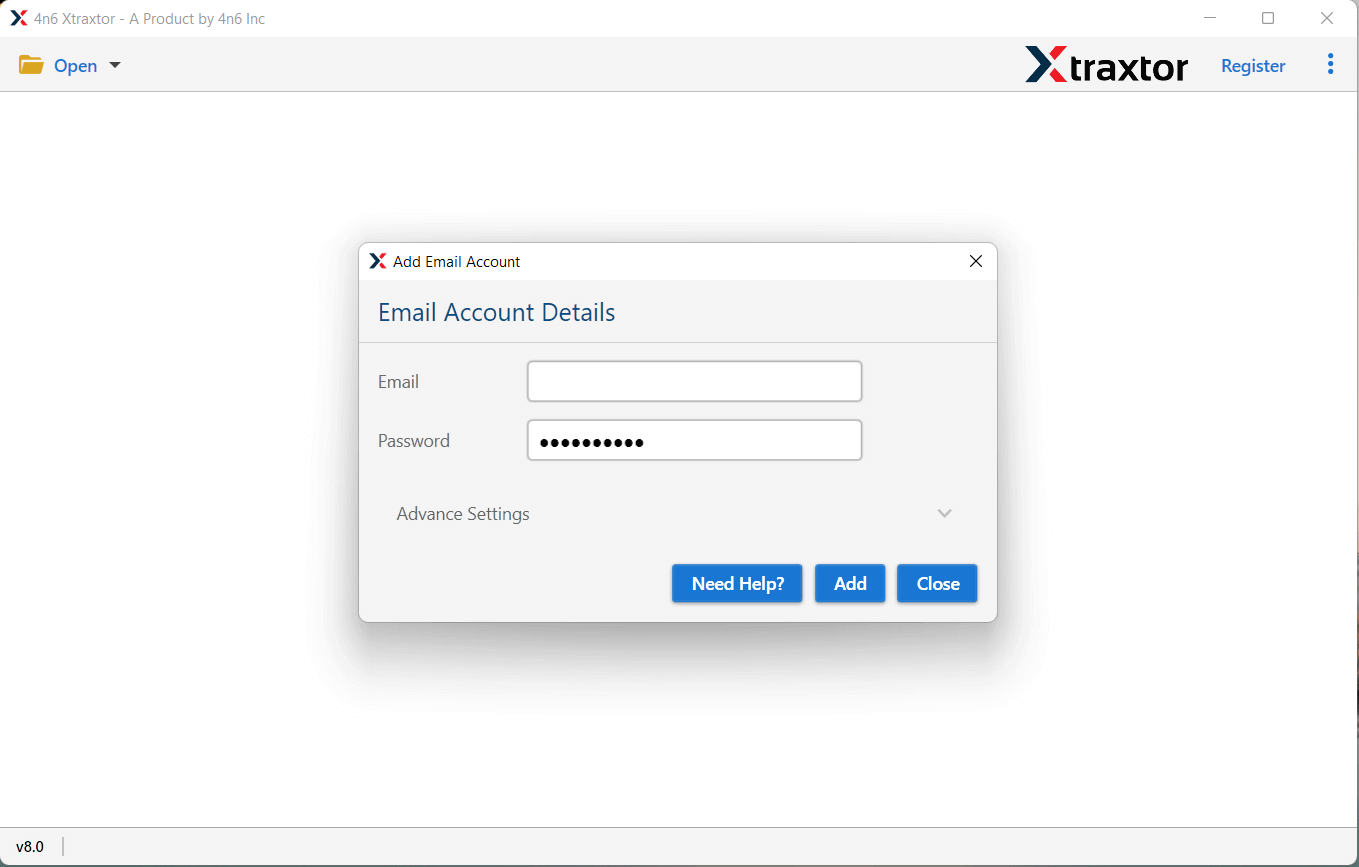
Step 3. Here, provide your Yahoo Mail account credentials & click the Add button.
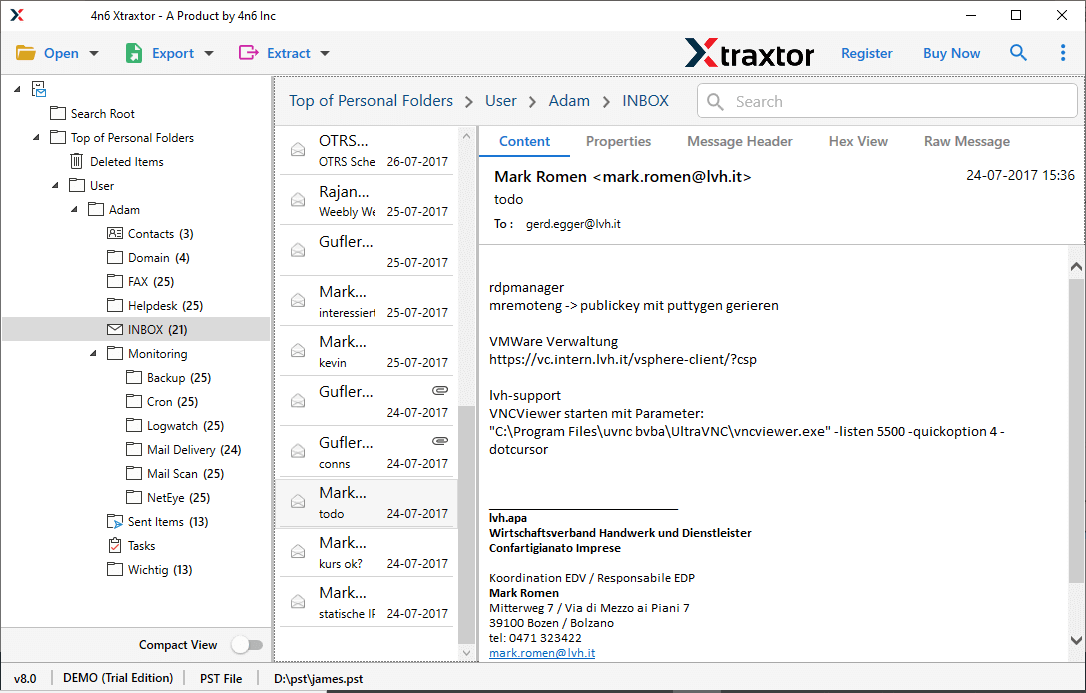
Step 4. Now, the software will load all data from your Yahoo mailbox, and see it before downloading attachments.
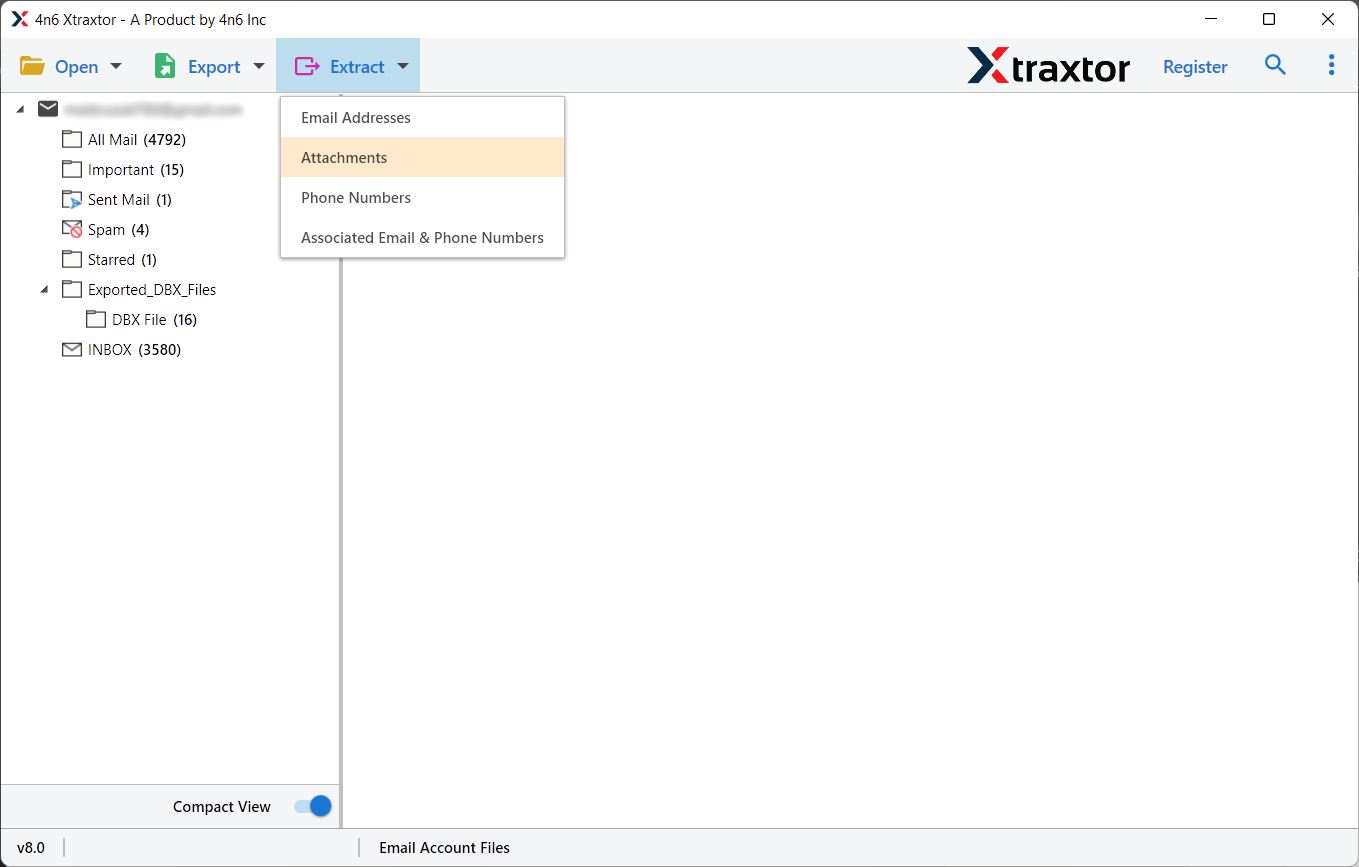
Step 5. Now, click on the Extract tab and choose the Attachments option.
Step 6. Click the browse button and choose desire location, after that click the save button to start.
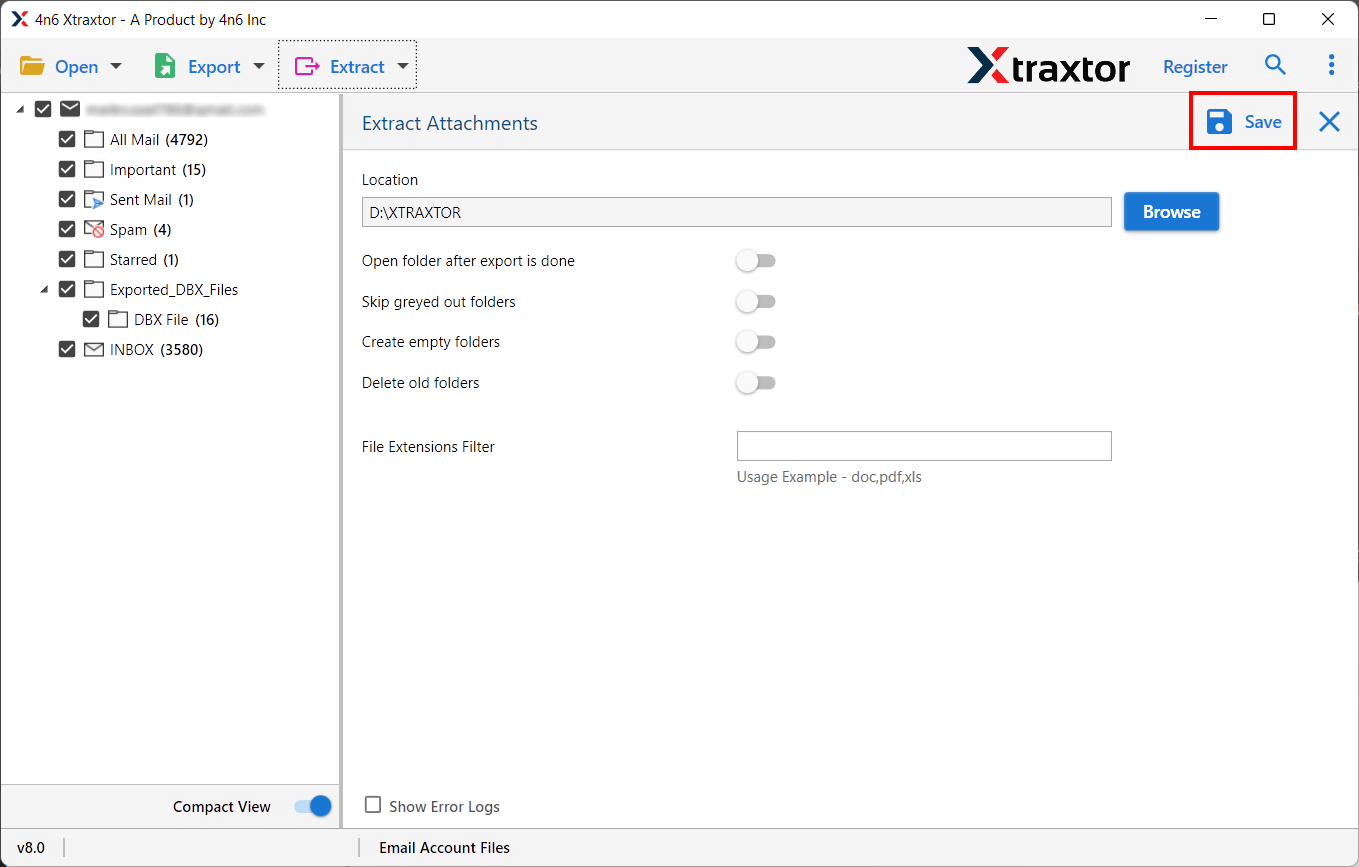
Done! You will get a log report soon that will confirm that all the required attachments are exported to your chosen location.
You will be redirected to that location soon. After that, check all the Yahoo email attachments.
Why Choose an Automated Method instead of a Manual Procedure?
Why Choose an Automated Method instead of a Manual Procedure?
Manual downloading of attachments from Yahoo Mail works only when you have a few emails. But when attachments are spread across hundreds or thousands of emails, a manual procedure becomes slow, tiring, and unreliable. This is why most users prefer an automated solution like Xtraxtor.
Below are the key features that explain why an automated method is a better choice.
- Bulk Attachment Download Support: Manual methods force you to open each email individually. Xtraxtor allows you to download attachments from multiple emails in Yahoo Mail at once. So that you can save many hours of effort when dealing with large mailboxes.
- No Manual Email Opening Required: With manual downloading, every email must be opened separately. This software automatically scans your Yahoo Mail account and extracts attachments without opening emails one by one.
- Folder-Wise Attachment Extraction: The tool saves attachments in an organized folder structure so that it will be easy to identify which attachments belong to which emails or folders. Manual downloads usually create clutter on your system.
- Support for Large Mailboxes: Yahoo Mail has limitations when handling large volumes of data. But the mentioned software is designed to handle large mailboxes and thousands of attachments smoothly without errors.
- Secure and Safe Process: The software follows a read-only approach, which means no changes are made to your Yahoo Mail account; all your original emails and attachments remain intact & data security is maintained throughout the process
- Free Trial Option: Users can test the complete working of the tool without paying a single penny. The free demo version of this software allows you to check the tool, but with a criterion that you will be able to extract attachments from only 10 emails. Once you are satisfied with the working of the tool, upgrade to its licensed version to download unlimited attachments.
Conclusion
This article brings together all the available methods to save attachments from Yahoo Mail account. However, while exploring all these methods, we have found some important points that you must know before choosing any solution. If you have a few emails or want to do it for one email account, then you can choose a manual method. However, if you want an error-free, quick, and reliable approach, using an automated method is suggested only. It provides a direct way to export all attachments from Yahoo Mail in easy steps.
