How to Import Zimbra to Thunderbird Profile?

In this technical write-up, we will explain how to import Zimbra to Thunderbird. If you are also searching for a reliable solution, then you are in the right place. In this guide, we will walk you through both manual and automated methods to transfer emails from Zimbra to Mozilla Thunderbird without losing any data.
But before moving to the solutions, let’s understand why users need to migrate emails from Zimbra to Thunderbird.
Why Migrate from Zimbra to Thunderbird?
Thunderbird is a free, open-source email client developed by Mozilla. It is widely used due to its flexibility, security, and user-friendly interface.
Here are some benefits of using Thunderbird:
- Free and open-source application
- Supports IMAP, POP3, and SMTP protocols
- Easy to manage multiple email accounts
- Provides advanced add-ons and extensions
- Strong security and privacy features
- Simple interface for beginners and professionals
Now, let’s explore the two easy ways to import Zimbra emails to Thunderbird.
How to Import Zimbra to Thunderbird Free?
You can manually import Zimbra emails into Thunderbird, but this method requires multiple steps and technical knowledge.
Follow the steps below:
- Login to your Zimbra account
- Export mailbox data in TGZ format
- Extract the TGZ file on your system
- Open Thunderbird and install ImportExportTools NG add-on
- Create a new folder under Local Folders
- Right-click on the folder and choose ImportExportTools NG
- Select Import Messages >> All Files
- Choose extracted files and click Open
This will start importing Zimbra emails into Thunderbird.
However, this method has several limitations. It is time-consuming and not suitable for large amounts of data. Also, there is no option for selective migration, and compatibility issues may occur with newer Thunderbird versions.
How to Transfer Zimbra Emails to Thunderbird Automatically?
To simplify the process, you can use the Xtraxtor. This professional utility allows you to import Zimbra to Thunderbird in just a few simple clicks. With this tool, you can transfer complete mailbox data, including attachments, email properties, and folder structure. It also provides advanced filters to export only selected emails.
Download the tool for free to explore its complete working steps.

Steps to Import Zimbra to Thunderbird Profile
Step 1. Run the Xtraxtor software on your system.
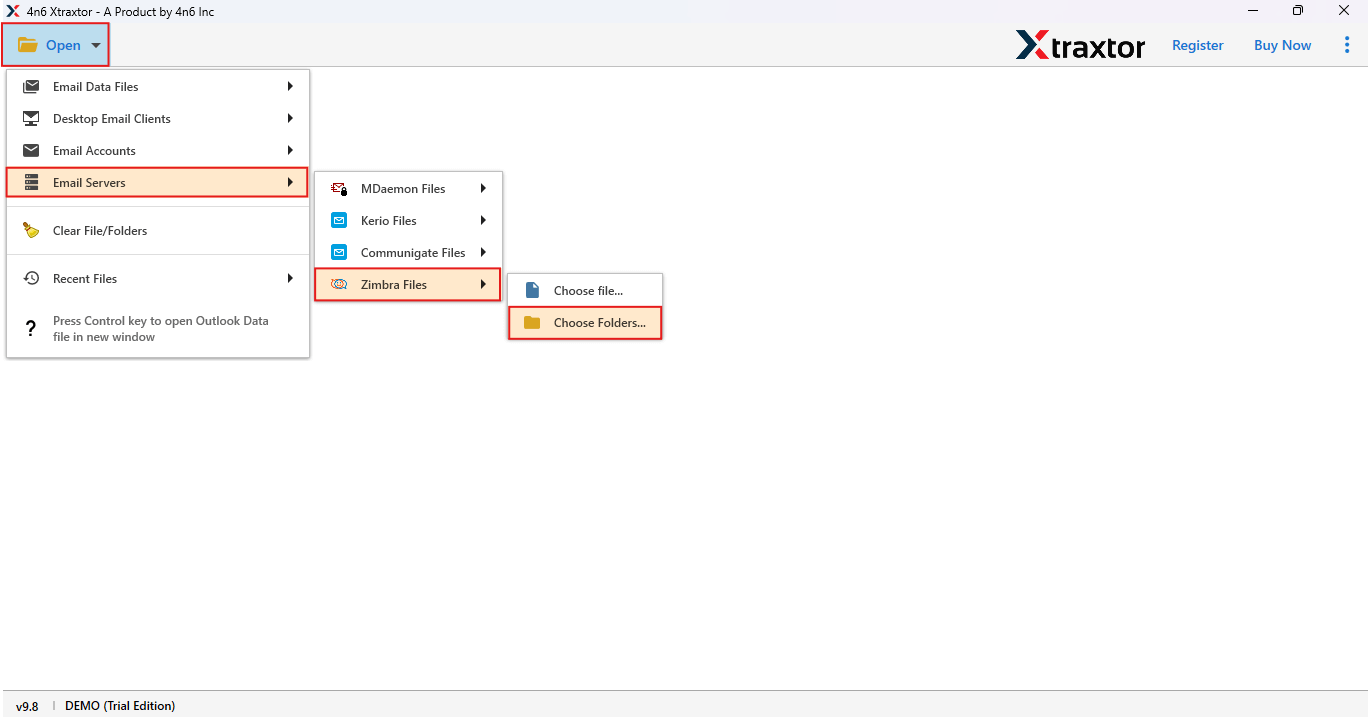
Step 2. Click on Open >> Email Server >> Zimbra Files and upload TGZ file.
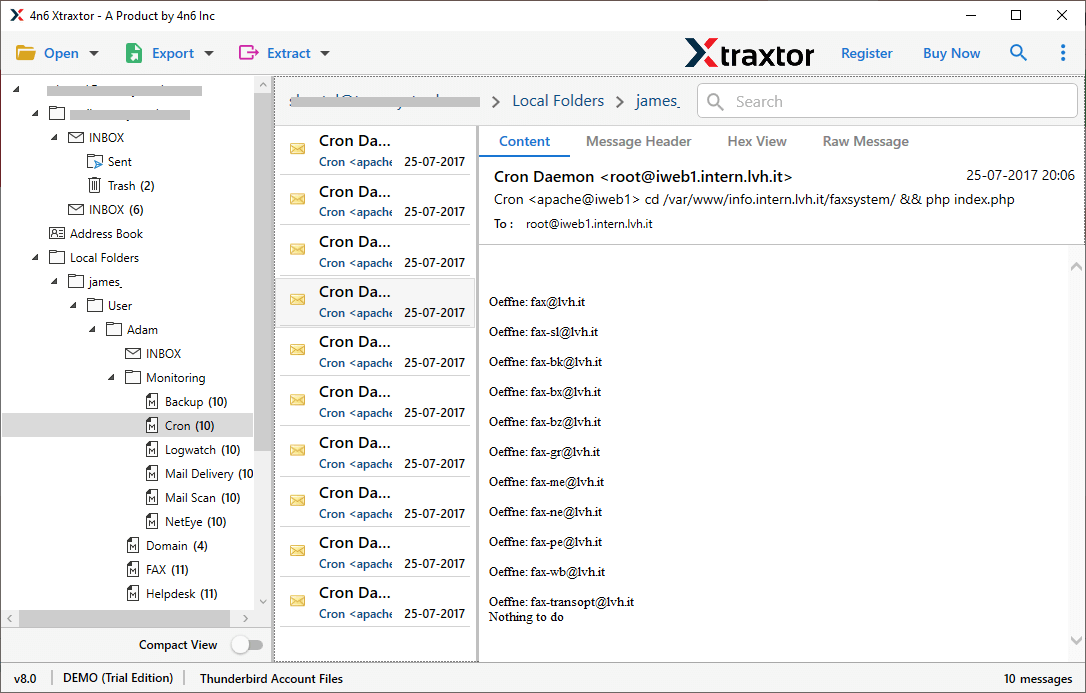
Step 3. Preview all emails in the software panel.
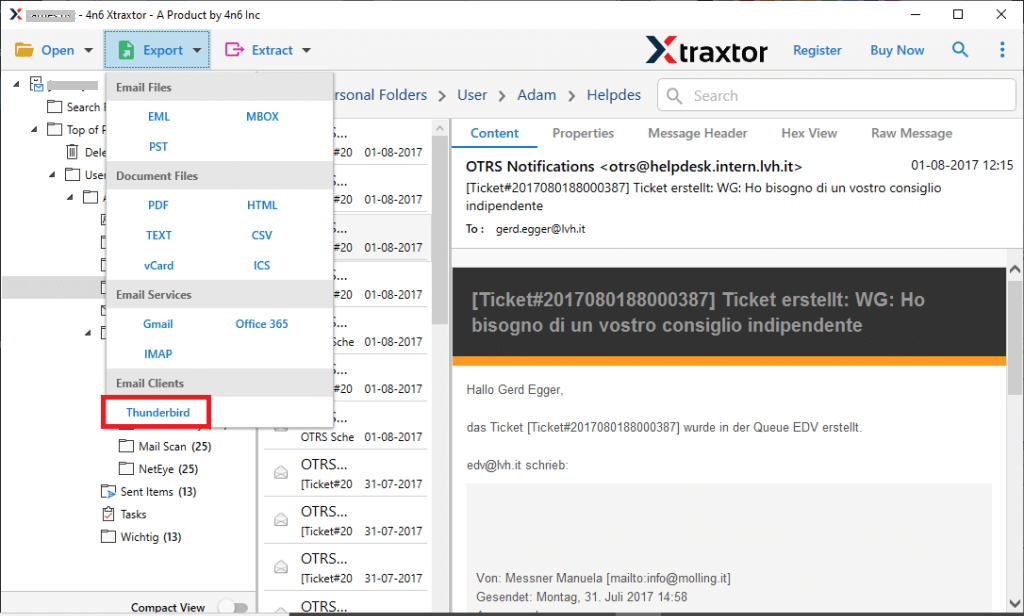
Step 4. Click on Export and select Thunderbird as the saving option.
Step 5. Choose the required folders of your choice.
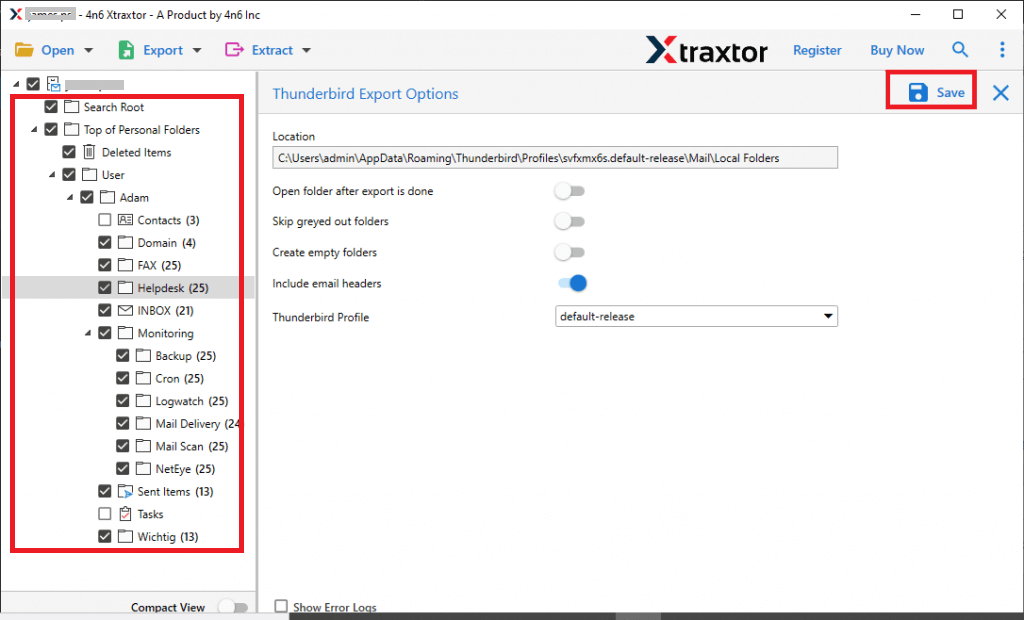
Step 6. Click on Save to start the process.
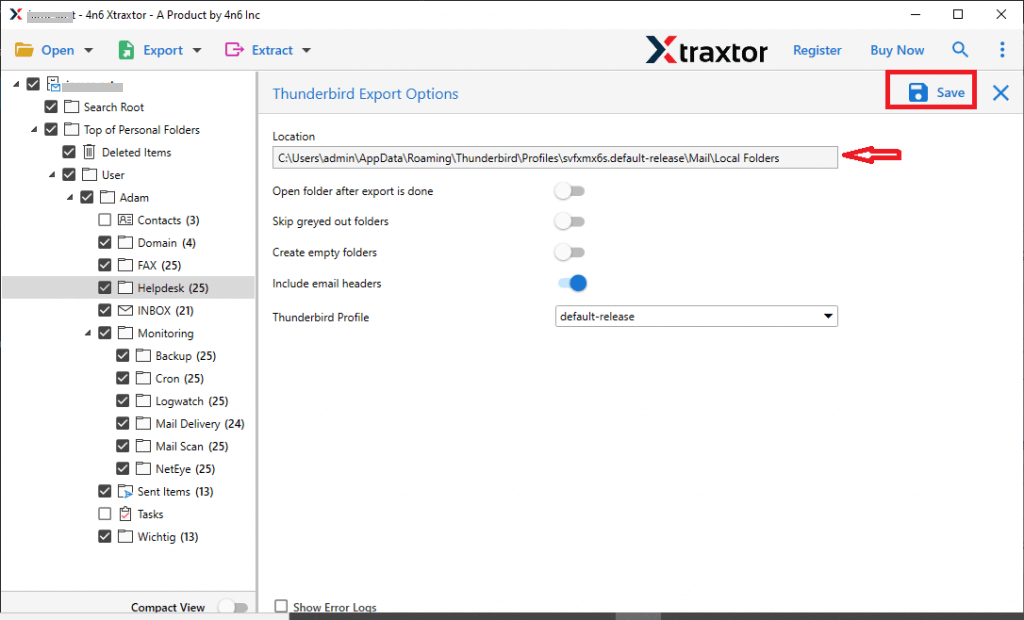
Note: Thunderbird should be installed on your system for this process.
Why Choose Xtraxtor Zimbra to Thunderbird Converter?
There are many reasons to choose this automated tool for this task. Some of them are as follows;
- Direct Migration: This tool allows you to directly import Zimbra emails to Thunderbird without any extra configuration or plugins.
- Safe and Secure: The software ensures 100% accurate migration while keeping email data safe and unchanged during the process.
- Works Offline: You don’t need an internet connection to migrate Zimbra files to Thunderbird. The tool works smoothly in offline mode.
- Maintain Folder Structure: It preserves the original folder hierarchy and subfolders exactly as they are in the Zimbra mailbox.
- Bulk Conversion: Easily migrate multiple Zimbra mailboxes or large data files at once without any limitation.
- Selective Migration: Apply filters like date, subject, sender, etc., to transfer only required emails.
- Supports Multiple Formats: Apart from Thunderbird, you can also export Zimbra to PST, EML, MSG, PDF, HTML, and more formats.
- Includes Attachments: All email attachments are preserved and remain linked with their respective emails after migration.
- User-Friendly Interface: Simple and easy-to-use interface suitable for both technical and non-technical users.
- Windows Compatibility: Supports all versions of Windows OS, including the latest Windows 11.
Final Words
Many users look for a way to import Zimbra to Thunderbird. While a manual method is available, it is indirect and comes with several limitations, making it less reliable for large data. Therefore, using a professional tool is a better choice for smooth and error-free migration. It helps you transfer all emails quickly without losing any data. You can also try the demo version to check its performance. Once satisfied, you can upgrade to the full version for complete and unlimited migration.
