How to Import PST to Evolution Mail?

Users are looking for ways to import PST to Evolution Mail due to changes in email clients, operating system migration, or the need to access old Outlook data in a Linux environment. Evolution Mail is a widely used email client, especially among Linux users, because it offers email, calendar, and contact management in one place.
However, users often face difficulties when trying to open Outlook PST files in Evolution Mail. This happens because Microsoft Outlook stores data in PST format, while Evolution Mail works with standard mail protocols like IMAP.
In this guide, we will explain the best and easiest method to import PST to Evolution Mail using an automated solution. The recommended tool simplifies the process and ensures that all emails, attachments, and folders are transferred safely.
Reasons to Import PST to Evolution Mail
Many users move from Microsoft Outlook to Evolution Mail for several reasons. Some common situations include:
- Many Linux users prefer Evolution Mail as their default email client and need to access their old Outlook PST emails.
- Organizations migrating from Windows systems to Linux environments often need to import PST data into Evolution Mail for continued communication.
- Users sometimes keep old PST files as backups and want to open those archived emails in Evolution Mail.
- IT administrators may receive PST files from previous Outlook installations and need to recover and access those emails in Evolution.
- If Outlook becomes inaccessible or the Windows system fails, the PST file remains the only source of mailbox data, which users want to open in Evolution Mail.
How to Move PST Emails into Evolution Mail in Easy Steps?
Since Evolution Mail does not support PST files directly, the best solution is to use a reliable utility like Xtraxtor. This software allows users to transfer PST emails directly to an email account configured in Evolution Mail using the IMAP protocol.
The tool is designed to import PST data automatically while maintaining folder hierarchy, attachments, and email formatting. It also supports both ANSI and Unicode PST files without any issues.
With this utility, users can easily migrate PST emails to Evolution Mail with complete data integrity and accuracy.

Steps to Import PST to Evolution Mail
Step 1. First, download and install the software on your computer and launch the software.
Step 2. After that, click on Open >> Email Data File >> PST File to add your Outlook PST file.
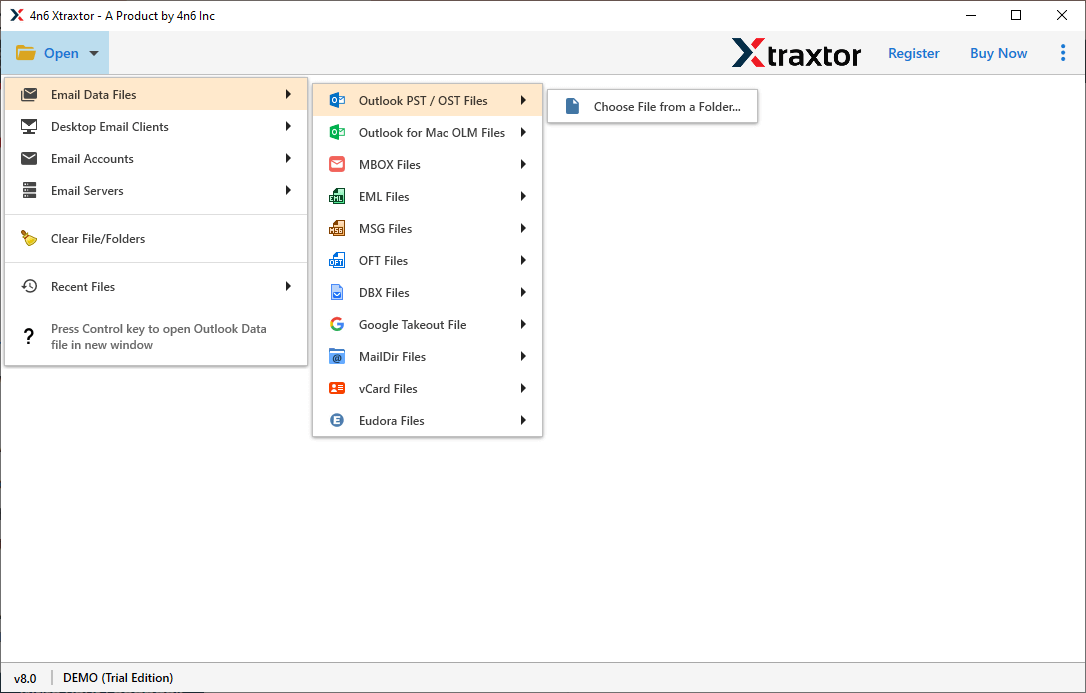
Step 3. Now the software will load and preview all mailbox folders from the PST file.
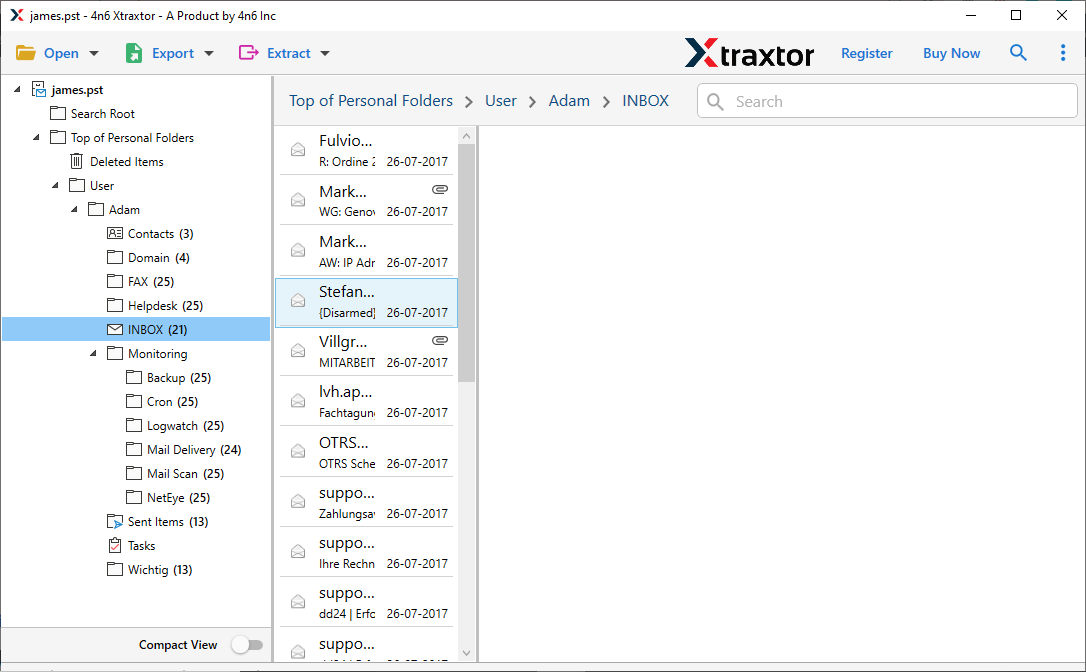
Step 4. Next, click on the Export option and choose IMAP as the saving option from the list.
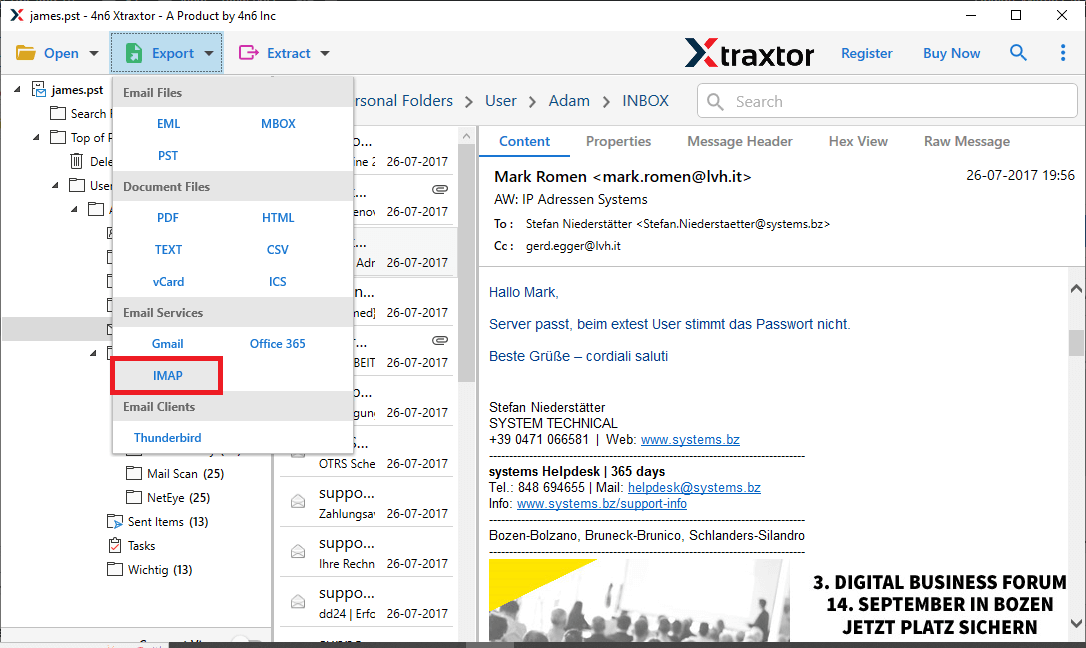
Step 5. Select the required folders that you want to import.
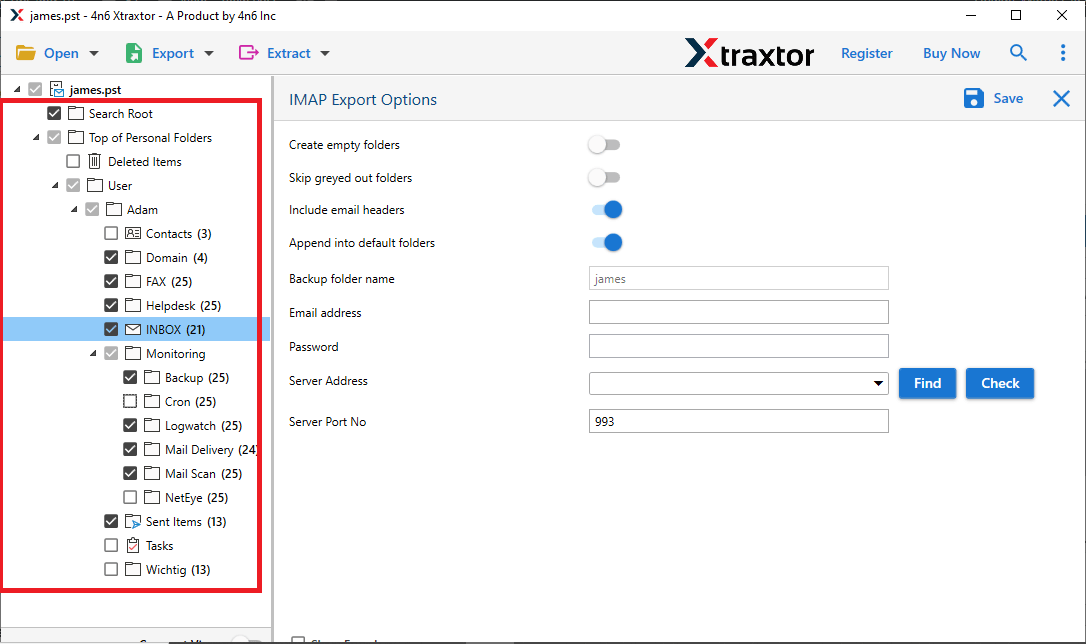
Step 6. Now, enter the email account credentials that are already configured in Evolution Mail. Click save to start.
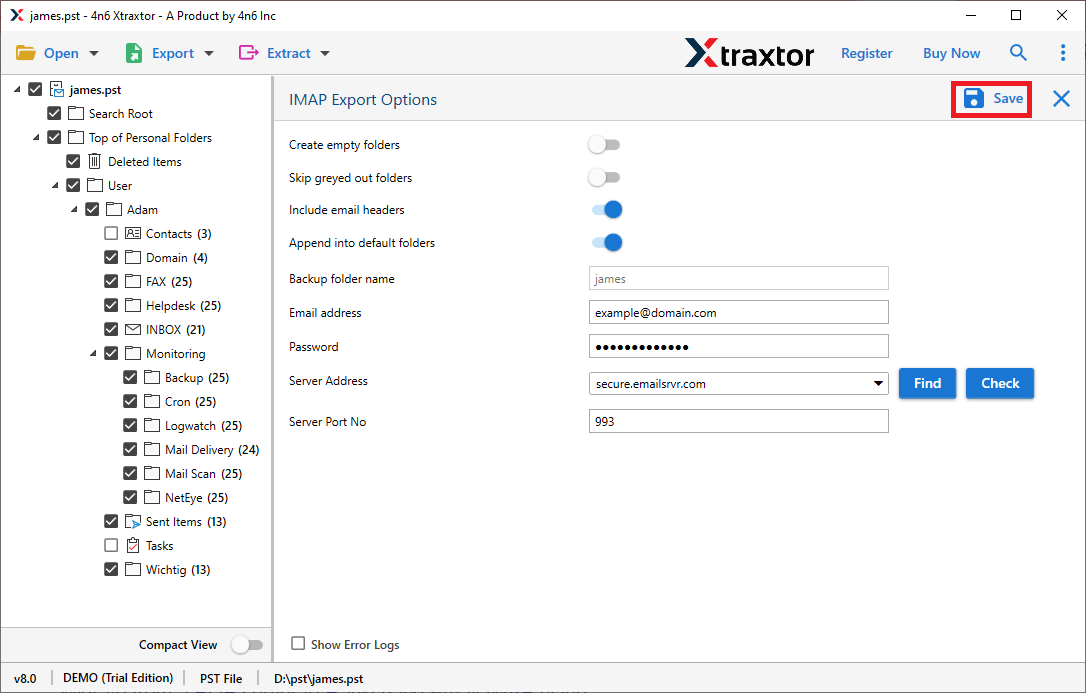
Once the process is completed, open your Evolution Mail client, and you will find all the imported PST emails there.
Software Features and Benefits
- Import PST Emails with All Components: The software allows users to transfer PST emails to Evolution Mail with complete details such as attachments, sender and receiver information, subject lines, and timestamps.
- Bulk Import PST Files: Users can add multiple PST files and import them together, saving time when dealing with large email archives.
- Standalone Tool: This utility works independently and does not require the installation of Microsoft Outlook to import PST files.
- Handles Large or Corrupted PST Files: The tool can easily process large, damaged, or partially corrupted PST files and recover the mailbox data during migration.
- Advanced Email Filters: Users can apply filters to migrate specific emails based on sender, recipient, date range, subject, or folder selection.
- Maintain Folder Structure: The tool preserves the original folder hierarchy and email formatting during the import process.
- Multiple Export Options: Apart from IMAP migration, the software can convert PST files to several formats, including MBOX, EML, PDF, DOC, HTML, and more.
- User-Friendly Interface: The simple interface allows both technical and non-technical users to perform PST migration easily.
To Conclude
In this blog, we explained the best solution to import PST to Evolution Mail without any complications. Since Evolution Mail does not support PST files directly, using a reliable migration tool becomes the most efficient approach.
The recommended software makes the entire process by transferring PST emails to Evolution Mail directly. The software also provides a free demo version, allowing users to test its functionality before performing the full migration.
