How to Import Postbox Emails to Gmail Directly?

Switching email platforms is common, especially when users move from desktop-based email clients to cloud services. If your emails are stored in Postbox and you now want everything inside Gmail, this guide is written for you. Many users search for “how to import Postbox to Gmail” because Gmail offers better accessibility, storage, and long-term reliability.
In this article, you’ll learn why users move from Postbox to Gmail, the best way to do it without data loss, and which method suits your situation.
Why Users Import Postbox Emails to Gmail?
Users don’t migrate emails randomly. Here are the real reasons people move from Postbox to Gmail:
- Gmail is free and cloud-based
- Emails are accessible anytime, anywhere
- No risk of data loss due to system failure
- Gmail works on all platforms (Windows, Mac, Linux, and mobile)
- No need to install desktop software
- Easy sharing, searching, and filtering of emails
In short, Gmail offers freedom, flexibility, and long-term safety.
Is there a Manual Way to move emails from Postbox to Gmail?
Technically, Postbox stores emails in MBOX-like formats. Gmail does not support direct Postbox import.
Manual methods usually involve:
- Exporting Postbox data
- Configuring IMAP
- Using third-party email bridges
These approaches are:
- Time-consuming
- Error-prone
- Risky for large mailboxes
- Not suitable for non-technical users
That’s why most users prefer a direct and automated solution.
How to Transfer Emails from Postbox to Gmail Directly?
In order to directly import Postbox emails to Gmail account, you can simply take the help of Xtraxtor Postbox Converter. This is a definitive solution that allows you to effectively upload mailbox items to Gmail. It is a handy utility that can be easily accessed by any novice with no technical expertise.
The software supports importing all Postbox mailbox folders to Gmail with no loss of data and size limitations. It is a Windows-based utility and easily installed on all versions of Windows OS, including Windows 10, 8, etc.
For this, first download the Postbox conversion tool, and afterwards follow the steps.

Steps to Import Postbox Emails to Gmail Account
Step 1. Install and run the Xtraxtor on your system.
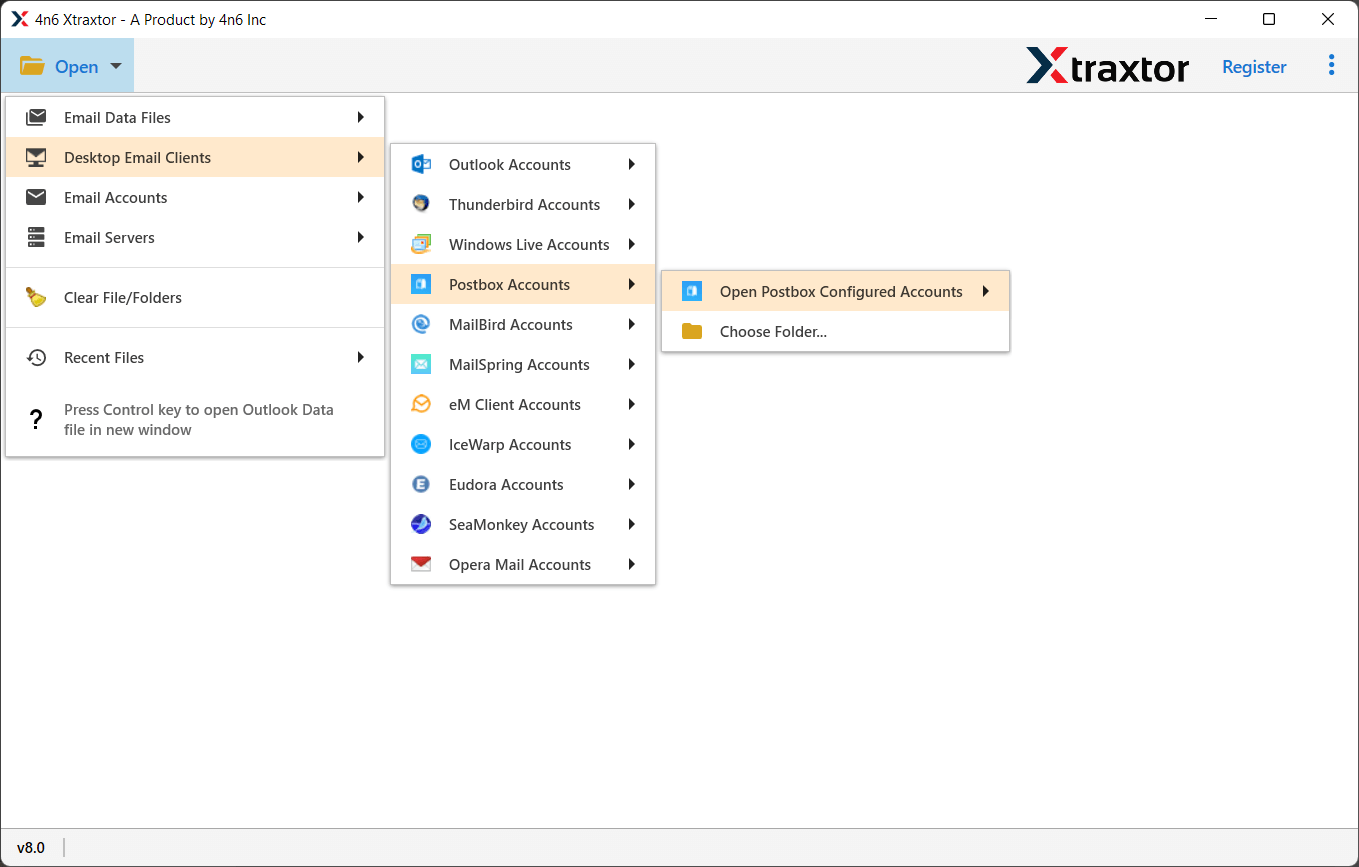
Step 2. Click Open>> Desktop Email Client >> Postbox Accounts >> Choose mailboxes
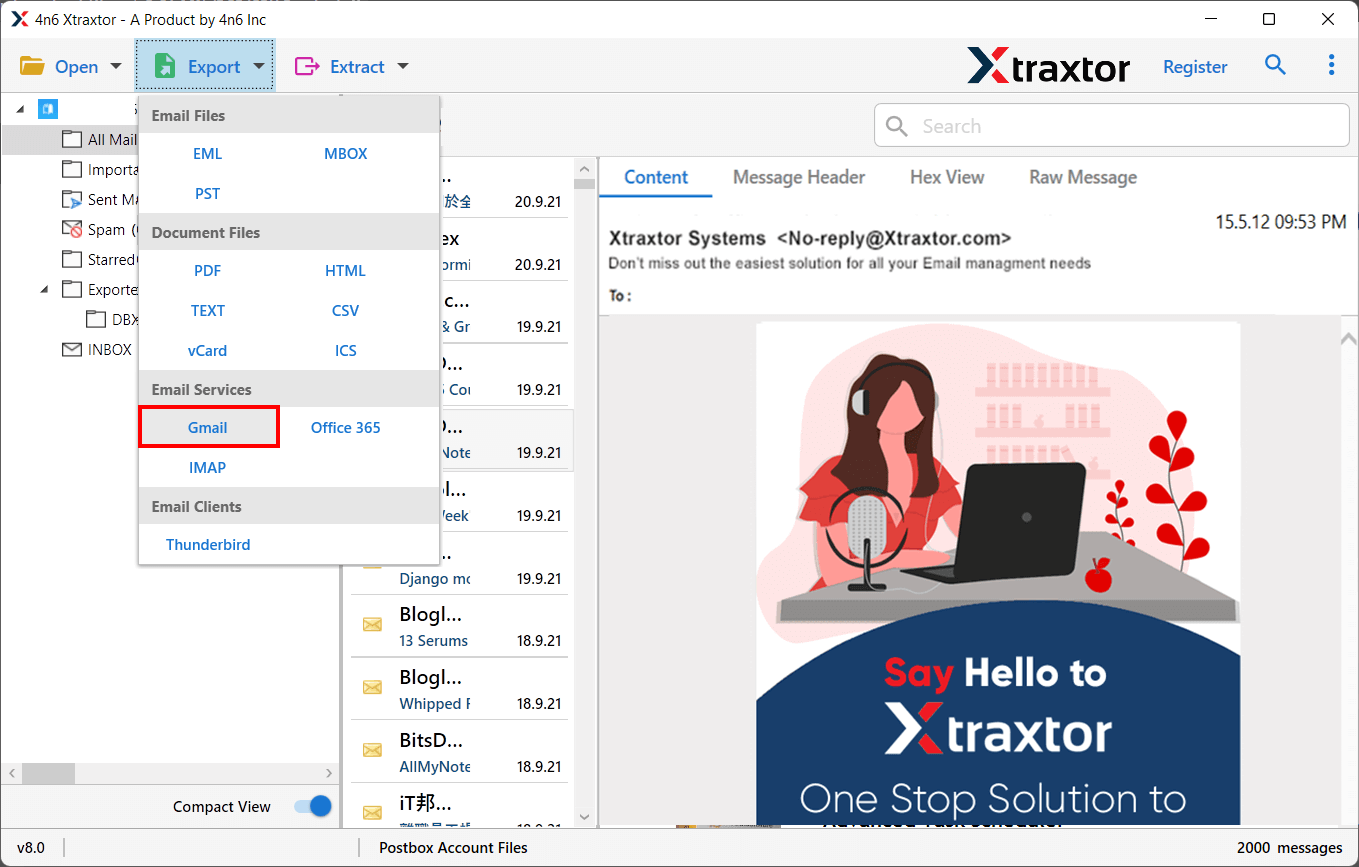
Step 3. Click the Export button and select Gmail from the saving list
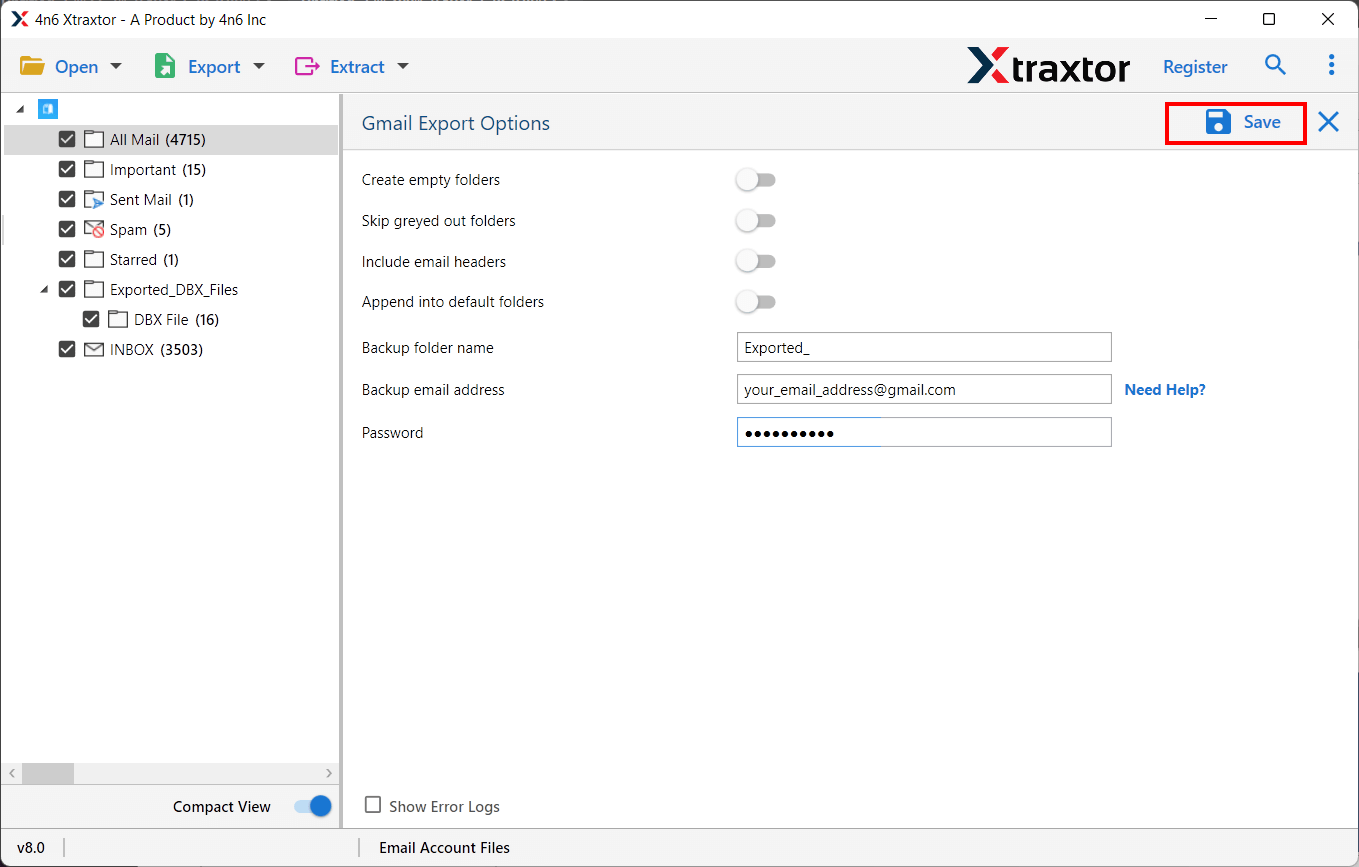
Step 4. Enter the credentials of your Gmail account and click the Save button.
You’re done! This is the complete and direct method to import Postbox files to Gmail account in a simplified way.
Benefits of Using the Postbox Conversion Tool
The utility offers various advanced features for its users to easily complete the import process according to their needs.
A few of the highlighted features of this tool are;
- Import all Postbox Mailbox Items: This is an ultimate utility that allows users to import full mailbox data items such as email, contacts, notes, tasks, etc.
- Bulk Option: The software also has a bulk mode feature that allows you to easily upload multiple Postbox mailboxes to a Gmail account at the same time.
- Save Emails with Attachments: This utility allows attachments associated with mailbox emails to be imported accurately. So you no need to worry about your attachments, the tool imports Postbox emails to Gmail along with attachments.
- Retains Folder Hierarchy: During the import Postbox to Gmail process, the utility maintains the on-disk folder structure of mailboxes.
- Dual Option: The software offers two modes for loading Postbox mailbox data. You can select the mailbox folders manually from your system, or the tool loads the mailboxes directly from the default location if Postbox is installed in your system.
- Preview Mode Available: The utility shows a preview of Postbox emails along with the attachments. You can click on emails one after another and see the preview before you start uploading the task.
Final Words
Here we’ve introduced the best and most professional Postbox mailbox conversion tool to import Postbox to Gmail account. With this utility, you can directly import Postbox files to Gmail via login credentials only. The software also offers a free demo version by which you can test the efficiency.
Frequently Asked Questions:
1. How many Postbox emails can be imported into a Gmail account?
Answer: The software does not have any limitations to import Postbox emails to Gmail account. You can use this utility to import an unlimited number of mailboxes.
2. Does this utility work on Mac OS?
Answer: No, you cannot install this software on a Mac. This is an entirely Windows-based utility.
3. Can I import specific Postbox mailbox items to Gmail account?
Answer: Yes, the utility provides an option to select and import certain emails from the mailbox items directly to a Gmail account.
5. Does the tool work without installing the Postbox email client?
Answer: Yes, the tool is completely self-contained and does not require installing the Postbox email client on the system to import Postbox to Gmail account.
