How to Convert SeaMonkey Mailbox to PST File?

Looking for a way to convert SeaMonkey mailbox to PST file? If you have the same question, you are in the right place. Many users still use SeaMonkey for email communication, but later decide to move to Microsoft Outlook for better security, advanced email management, and professional features. Since Outlook works with PST files, exporting SeaMonkey emails to PST becomes necessary.
In this blog, you will learn:
- Why users export SeaMonkey emails to PST
- Whether a manual method is available
- The easiest and safest way to convert SeaMonkey mailbox to PST
- Step-by-step instructions using a professional tool
So, let’s get started to know more.
How to Convert SeaMonkey Mailbox to PST File?
Download and run Xtarxtor software on a Windows system. The software can export data from SeaMonkey mailbox to PST format in a few simple clicks. It can convert all data at once in PST file. Using this tool, you can export only the necessary emails, contacts, or other data using filter options. It provides a preview option to view SeaMonkey mailbox data before the conversion process.
Moreover, the interface of this tool is very simple and easy to use. Any novice user can convert SeaMonkey emails to PST file without in-depth technical knowledge. With this utility, you do not need to install any other applications to perform the exporting process.
You can download the free demo version of this tool that helps to check its work performance and accuracy.

Steps to Export SeaMonkey Mailbox to PST
Follow the steps below to convert SeaMonkey emails to PST File:-
Step 1. Launch Xtraxtor Email Backup Tool on your Windows PC.
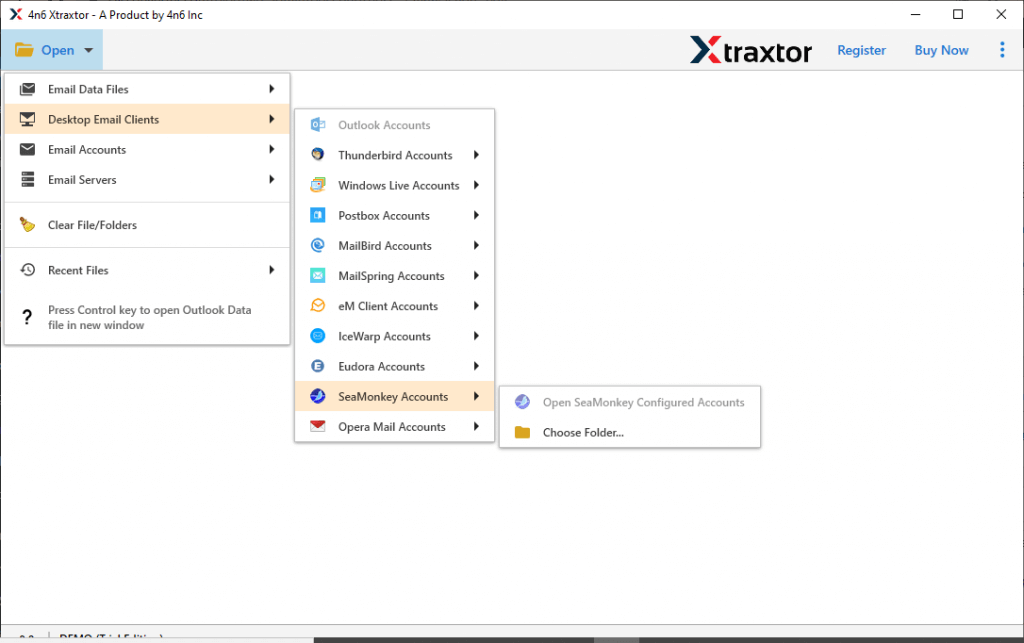
Step 2. Now, navigate to Open >> Desktop Email Clients >> SeaMonkey Account >> Choose Folder.
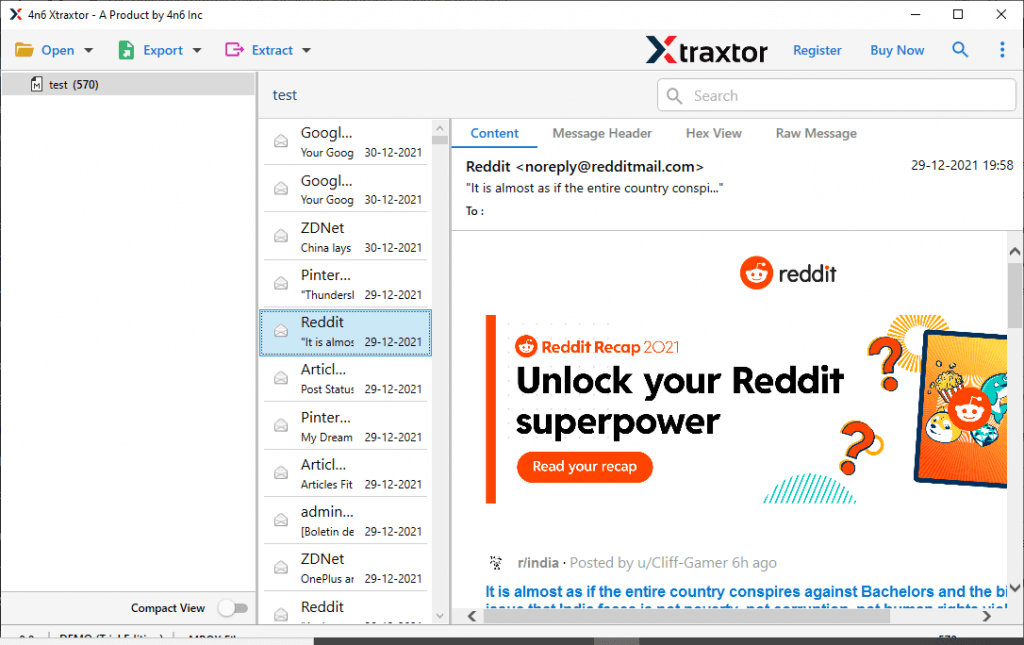
Step 3. Here you can view the emails of SeaMonkey account and choose require folder.
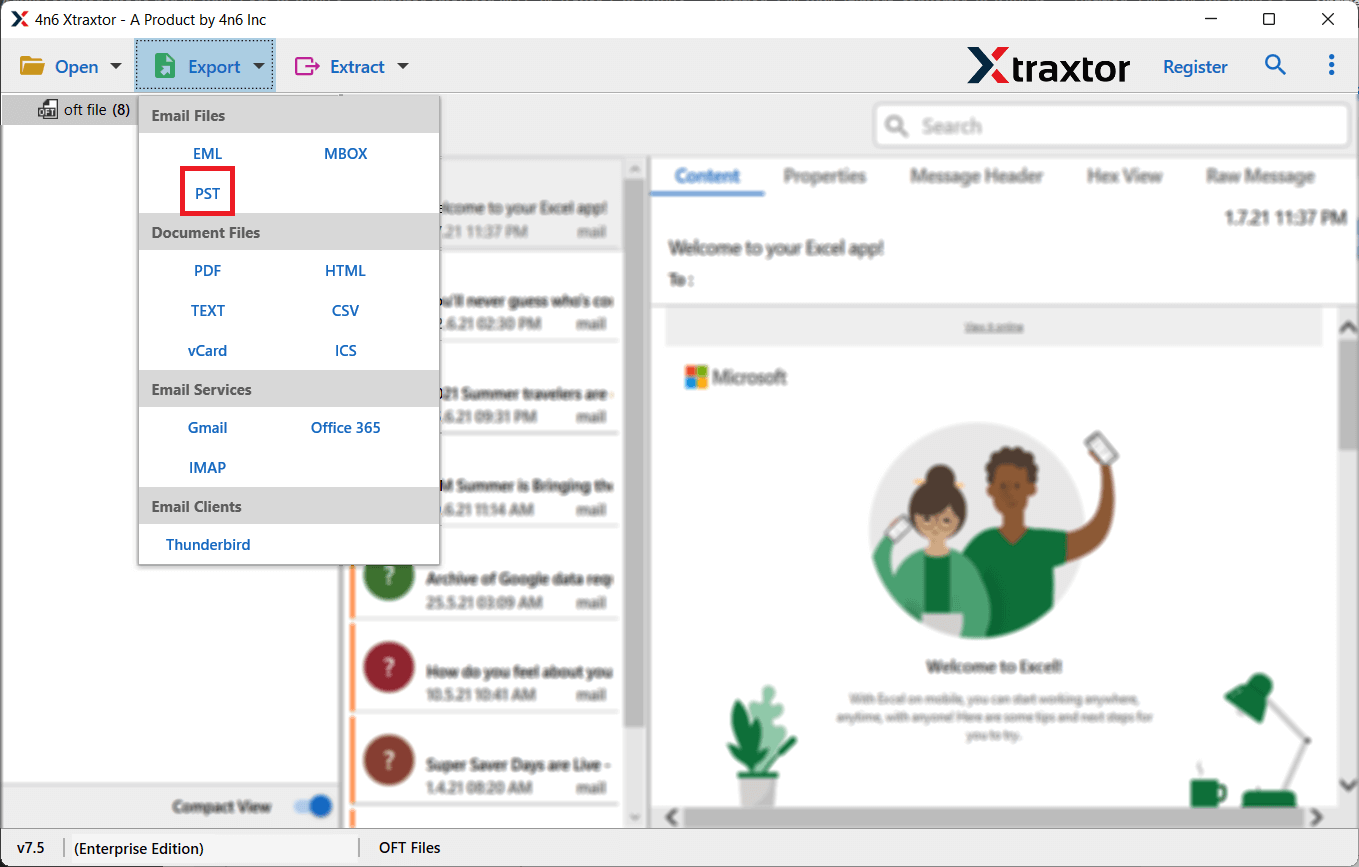
Step 4. After that, click on Export and select PST from the given options.
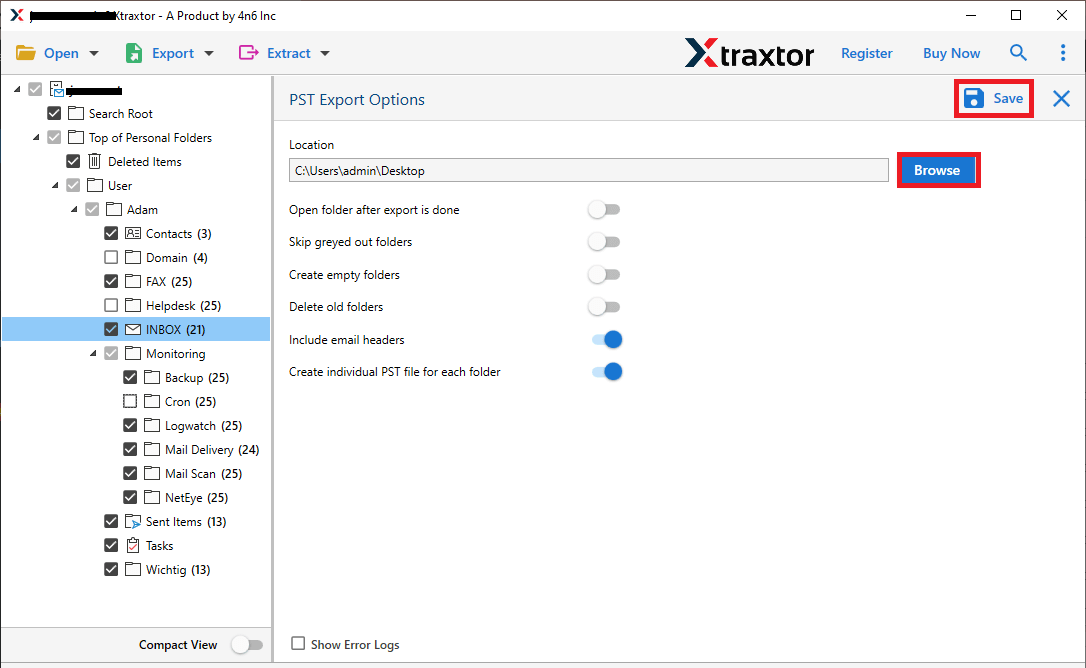
Step 5. Click on Browse to set the Destination path and then click on Save button to save the resultant file.
Done! Hence, you can easily convert SeaMonkey mailbox to PST in a simple manner.
Why Choose Xtraxtor? Know Here!
The software has many advantages that help you to export SeaMonkey emails to PST files, which are given here-
- Bulk Conversion: This software allows you to convert all mailbox data from SeasMonkey to PST file format at once without losing a single bit of data.
- Preview Mode: When you add SeaMonkey account, it loads all data from the SeaMonkey email account in the software panel. You can view and read the data before the exporting process. If you want to select any specific email, then you can easily find it here and select it.
- Retains Original Hierarchy: With this application, you do not worry about the structure of SeaMonkey mailbox data. It maintains the folder and subfolder structure during the process.
- Data Integrity: The software preserves the 100% data integrity during the conversion process. It gives accurate results after the process.
- Advanced Filter Options: The tool provides multiple filter options, such as to, from, cc, bcc, date, time, subject, etc. If you want to export email from a particular date and time. Then you can apply the filter option that helps you to convert particular data.
- Save Exported Data at Desired Location: The tool allows you to save the resultant file at your desired location. So that you can easily access it after the conversion process for further use.
- Directly Export SeaMonkey Email to any Webmail Account: Using this application, you can directly migrate SeaMonkey email to Thunderbird, Gmail, Office 365, etc.
- Simple Graphical User Interface: The interface of this utility is very simple and easy to use. Both technical and non-technical users can convert Seamonkey emails to PST without any external guidance.
- Vast Compatibility: You can run this application on any Windows-based system. It supports all the latest and older versions of Windows OS.
- Customer Support: The software provides 24*7 customer support to help you. If you have any doubts or problems related to the product, then you can contact our support team. They provide a proper solution to your problems as soon as possible.
Conclusion
Since there is no manual method available, using a reliable tool like Xtraxtor is the safest and easiest option. It ensures accurate conversion, preserves data integrity, and saves your valuable time. With the steps explained above, you can export SeaMonkey emails to PST smoothly and without any risk.
