How to Backup Rediffmail Emails to Computer

Are you in search of a way to backup Rediffmail emails to computer? Then, you are on the right page. Here, you will get a complete step-by-step guide to download emails from Rediffmail account to your local system. As getting the right solution is important, continue reading this blog to know more.
Why Do You Need to Backup Rediffmail Emails?
Backing up emails is not just about storage; it is about data safety and accessibility.
Key Reasons to Backup Rediffmail Emails;
- Offline Access: Access important emails without an internet connection
- Protection from Data Loss: Safeguard emails from accidental deletion, malware, or server issues
- Account Security: Prevent loss due to account suspension or hacking
- Easy Migration: Move emails to another email service smoothly
- Storage Management: Reduce mailbox size and improve performance
Creating a local backup ensures your emails remain safe and accessible anytime.
Methods to Download Emails from Rediffmail
There are two practical ways to save Rediffmail emails to your computer:
- Manual Method using MS Outlook
- Automated Method using Rediffmail Backup Tool
Let’s understand both in detail.
How to Save Rediffmail Emails to Computer?
This method allows you to export Rediffmail emails using Microsoft Outlook and save them in PST format.
Follow the given steps to backup Rediffmail emails to hard drive-
Step 1. Launch the MS Outlook email client on your system.
Step 2. Now, Click on File >> Info >> Add Account.
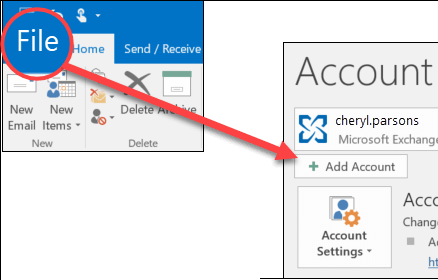
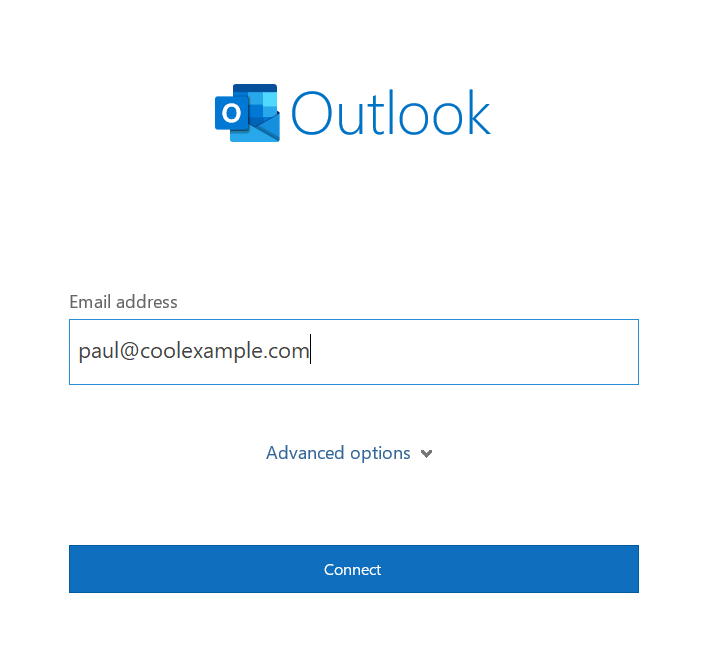
Step 3. Enter your Rediffmail email id and click on the Connect button.
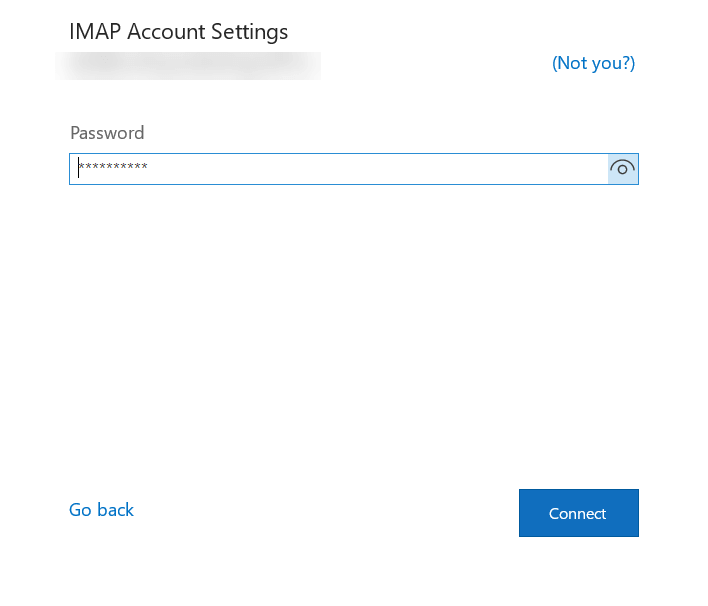
Step 4. Enter the Password of your Rediffmail account and finish the configuration process.
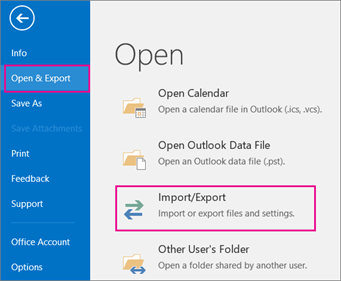
Step 5. In Outlook, go to File >> Open & Export >> Import/Export.
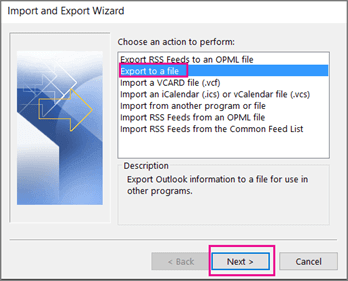
Step 6. Choose the Export to a file option from the Import/Export wizard and press Next.
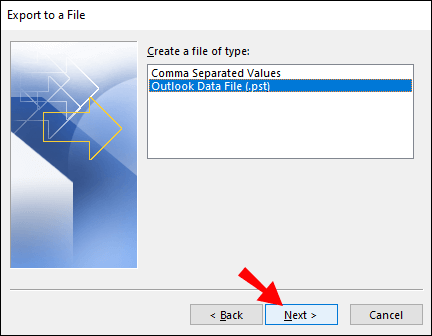
Step 7. Select the Outlook Data File (.pst) and click on the Next button.
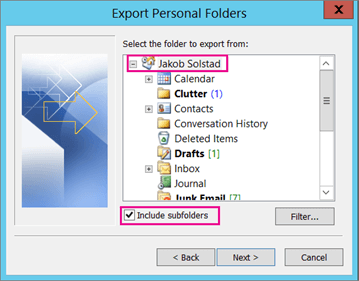
Step 8. Select email folders of the Rediffmail account that you want to save locally.
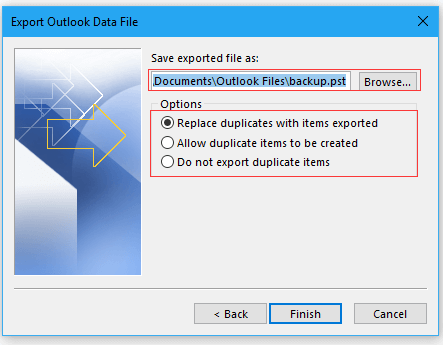
Step 9. Browse the destination location and click on the Finish button.
The process is complete, and your Rediffmail emails are now saved on your system. However, this method can be lengthy, time-consuming, and comes with certain limitations.
Why the Manual Method Is Not Recommended
While the manual solution works, it has several limitations that make it unsuitable for most users.
Drawbacks of the Manual Method
- Time-consuming for large mailboxes
- Complex setup for non-technical users
- Requires an Outlook subscription
- No selective filtering options
- High risk of errors or incomplete backup
Due to these issues, manual backup is not ideal for business users or users with large amounts of email data.
How to Download All Emails from Rediffmail to PC Securely?
Now, try Xtraxtor Email Backup Wizard, which is a secure and easy-to-use solution to download all emails from Rediffmail to your PC. The software safely connects to your Rediffmail account using an encrypted login, downloads all emails in bulk along with attachments and save them to your computer in multiple file formats.
It is designed for both technical and non-technical users, works smoothly with large mailboxes and allows you to access your emails offline anytime. For anyone looking for a fast, reliable, and secure way to download all Rediffmail emails to a PC, this software provides a simple and effective solution.
Download its free demo version and perform the backup process in a few simple steps.

Steps to Backup Rediffmail Emails to Computer
Step 1. Launch Xtraxtor on your Windows system.
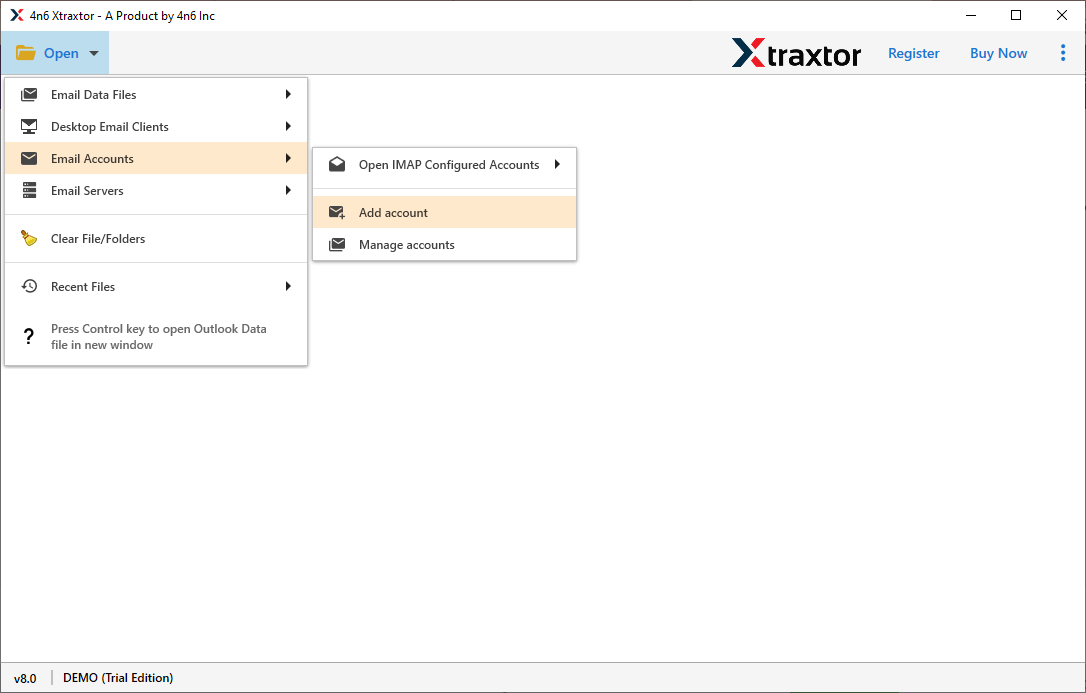
Step 2. Now, click on Open >> Email Accounts >> Add Account.
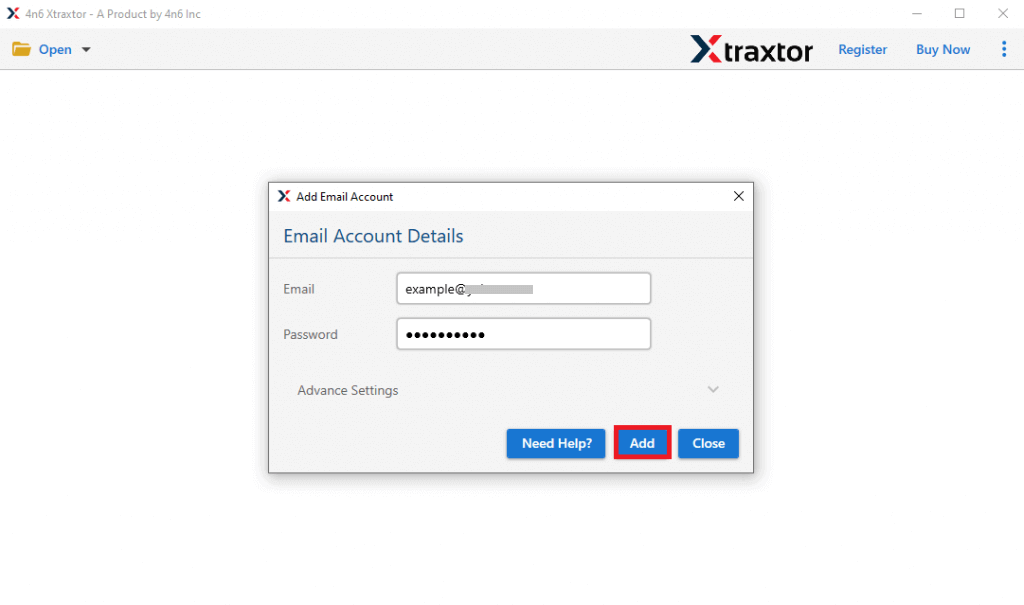
Step 3. Enter your Rediffmail login details and click on the Add button.
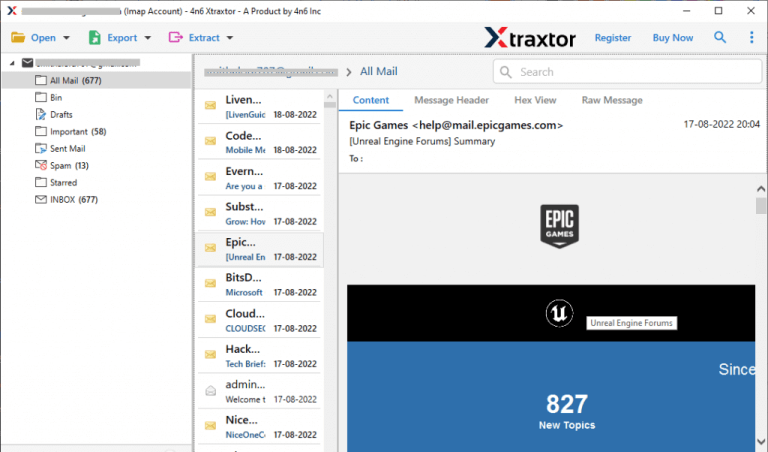
Step 4. Here you can view your emails before backup.
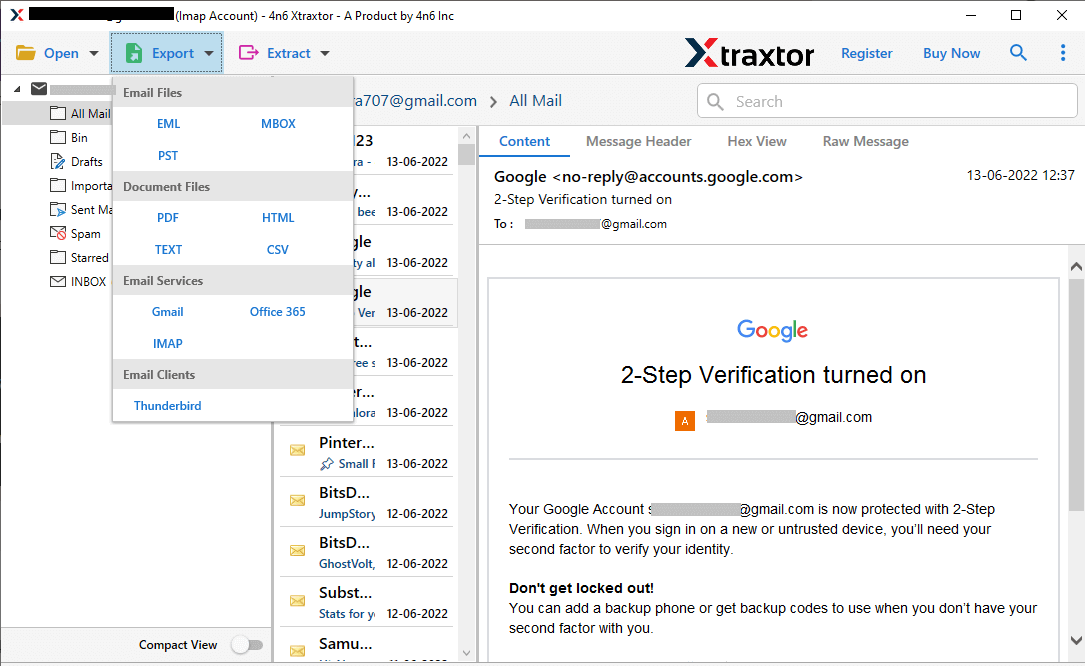
Step 5. After that, click on Export and select any file from the given options.
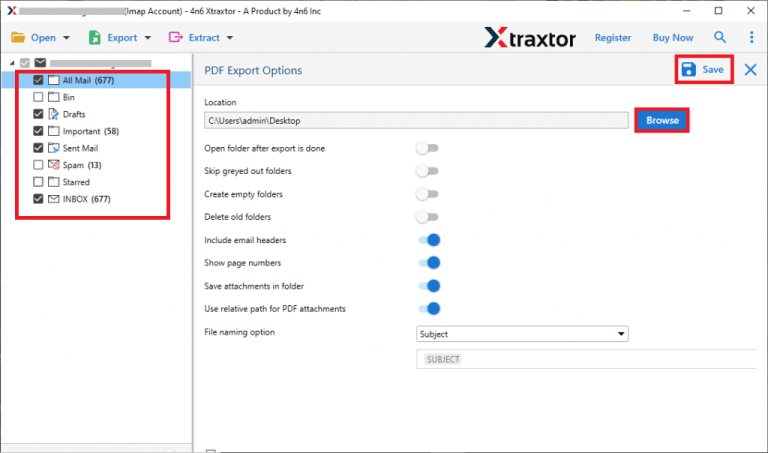
Step 6. Choose the email folders to export.
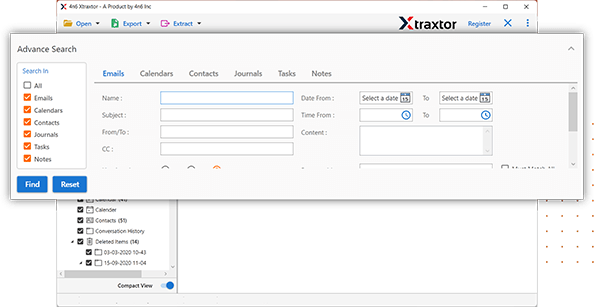
Step 7. Apply the filter options to backup selective emails.
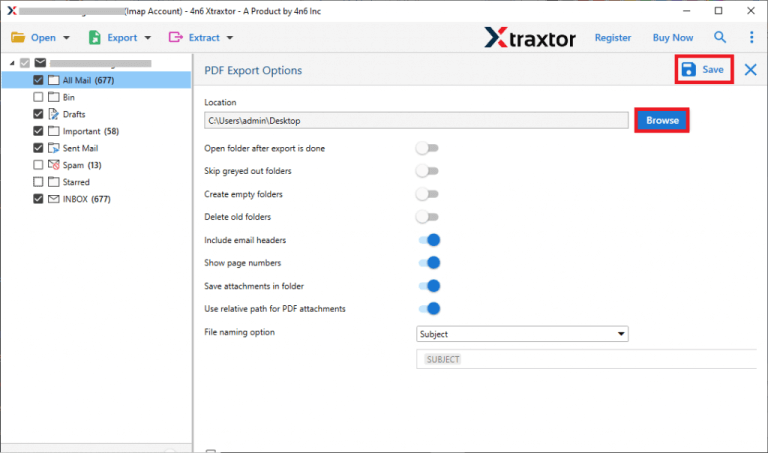
Step 8. Browse the location to save Rediffmail emails, then click Save to start.
Reliable Features of the Rediffmail Emails Backup Tool
The Rediffmail Backup Tool comes with several smart features designed to provide a seamless and efficient backup experience. Here are some of its key features:
- Multiple Backup Formats: The tool supports over 10+ file formats, such as PST, EML, MBOX, PDF, and MSG, allowing you to backup Rediffmail emails in the format that suits your needs.
- Batch Backup: You can batch backup emails from multiple Rediffmail accounts, saving time and effort for users or businesses with multiple email accounts to manage.
- Preserve Folder Structure: The tool maintains the folder hierarchy (Inbox, Sent, Drafts, etc.) during backup, ensuring your emails are organized in the same structure as in your Rediffmail account.
- Attachment Backup: Attachments within emails are backup along with the emails, ensuring no important data is lost.
- Selective Backup: You can choose to backup specific folders or even individual emails based on your preferences, giving you flexibility in how you manage your backups.
- Data Integrity: The tool ensures the integrity of your data during the backup process, preventing any corruption or loss of emails, attachments, or metadata.
- Security and Privacy: Your Rediffmail account credentials and data are handled securely with encryption during the backup process, ensuring privacy and protection of your sensitive information.
- Fast Backup Speed: The tool is optimized for fast backup speeds so that you can backup a large number of emails quickly and efficiently.
- User-Friendly Interface: The tool has an intuitive, easy-to-use interface, making it accessible for both technical and non-technical users. You don’t need advanced skills to use the software.
- Save Emails from any Webmail Account: The Email Backup Tool directly downloads emails from any email account. With the help of this tool, you can backup Yahoo, Gmail, Zoho Mail, Yandex, and other Webmail accounts.
Final Thoughts
In the above post, we have explained two techniques to backup Rediffmail emails to hard drive. One is a manual solution that comes with some limitations. And the second one is a professional method that can directly download emails from Rediffmail to Computer in a simple manner without losing a single bit of data.
