How to Export Outlook Emails to HTML Format?

Overview: Are you looking for a simple way to export Outlook emails to HTML format so you can open them in any web browser? If yes, then this blog is just for you. Here, we will explain how to convert Outlook emails to HTML format without any hassle.
Microsoft Outlook is one of the most popular email applications, but sometimes users need to access emails without Outlook. In such cases, saving emails in HTML format becomes very useful. HTML files can be opened in any browser, shared easily, and even used for web publishing.
In this guide, you will learn both manual and professional methods to export Outlook emails to HTML, along with their advantages and limitations. So, read this article till the end.
Why Do You Need to Export Outlook Emails to HTML?
There are several reasons why users want to export Outlook emails to HTML format:
- HTML files can be opened in any web browser without Outlook.
- It is a lightweight and universally supported format.
- Easy to share emails via the web or upload to websites.
- Helps in creating email backups in a readable format.
- Useful for editing email content in HTML editors.
- Ideal for developers and website owners to reuse email content.
There are different ways to save Outlook emails as HTML. You can choose a manual method or use a professional tool based on your needs.
How to Save Outlook Email as HTML Individually?
Here, we will use a built-in option provided by Outlook to save emails in HTML format.
- Open Microsoft Outlook on your system.
- Select the email you want to export.
- Click on File >> Save As.
- Choose the location to save the file.
- Select HTML from the “Save as type” dropdown.
- Click Save.
Now, you can open the saved file in any browser like Google Chrome or Mozilla Firefox.
Limitations:
- Suitable only for a few emails.
- Time-consuming for bulk export.
- No advanced options like filtering or naming conventions.
How to Convert Outlook Emails to HTML Files in Bulk?
Easily convert Outlook emails to HTML files in bulk with the help of Xtraxtor. This tool allows you to export multiple emails from Microsoft Outlook into HTML format in just a few clicks. You can select single or multiple folders and convert them at once without any data loss. It also keeps your email formatting, attachments, and other details safe during the process.
The software offers useful filters to export only selected emails by date, subject, or sender. With its simple interface, anyone can use it without technical knowledge. It is a quick and reliable solution to save Outlook emails as HTML files and open them in any web browser easily.
Download the free version to explore how the software works.

Steps to Export Outlook Emails to HTML Format
Follow the given instructions to export multiple Outlook emails to HTML files in bulk;
Step 1. Install and run the software on your Windows system.
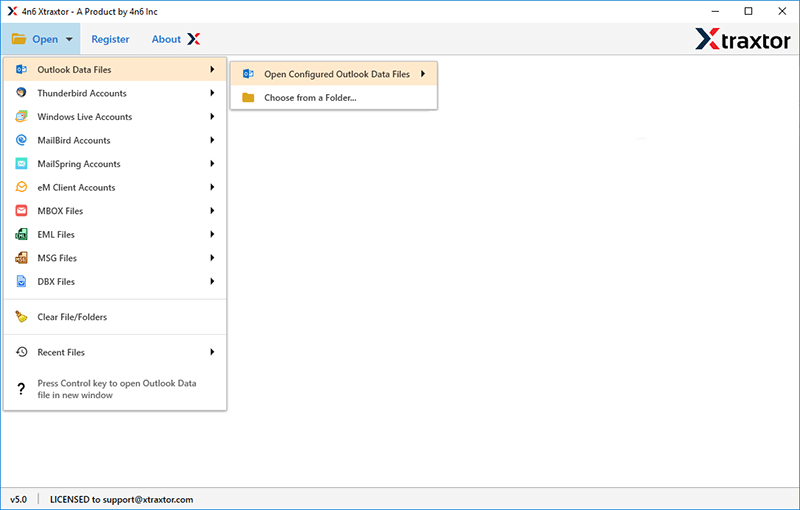
Step 2. Now, click on Open >> Desktop Email Clients >> Outlook Data Files >> Open Configured Outlook Data Files.
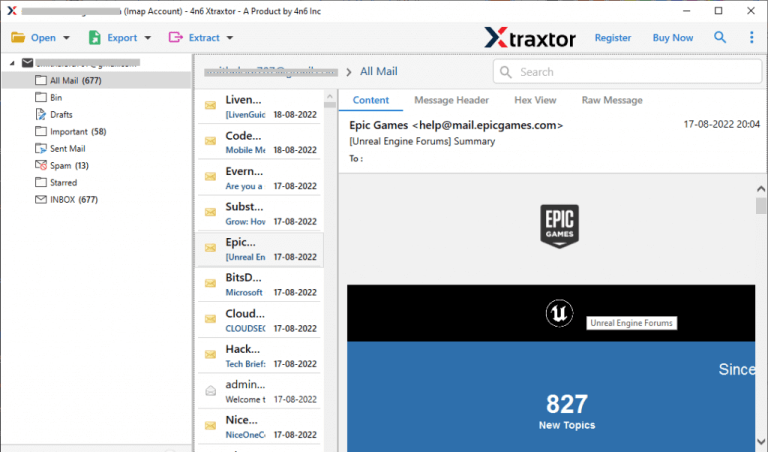
Step 3. Here, you can preview all emails from your Microsoft Outlook mailbox before converting them to HTML format.
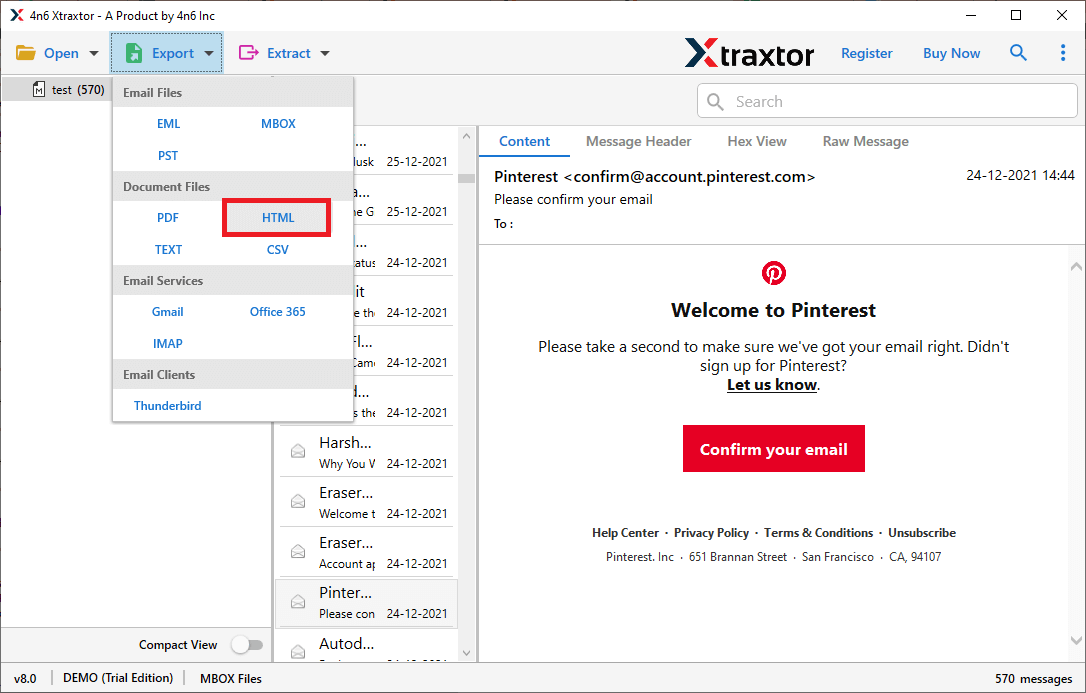
Step 4. Click on the Export option and choose HTML as the saving format.
Step 5. Select the required email folders if you want to export only specific data.
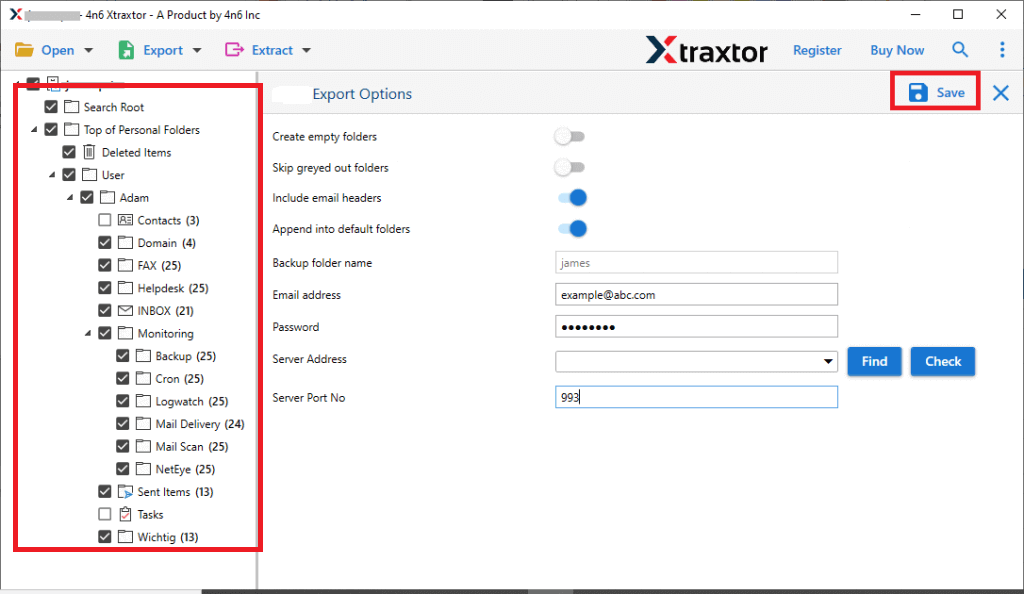
Step 6. Choose the destination location & click on the Save button to start.
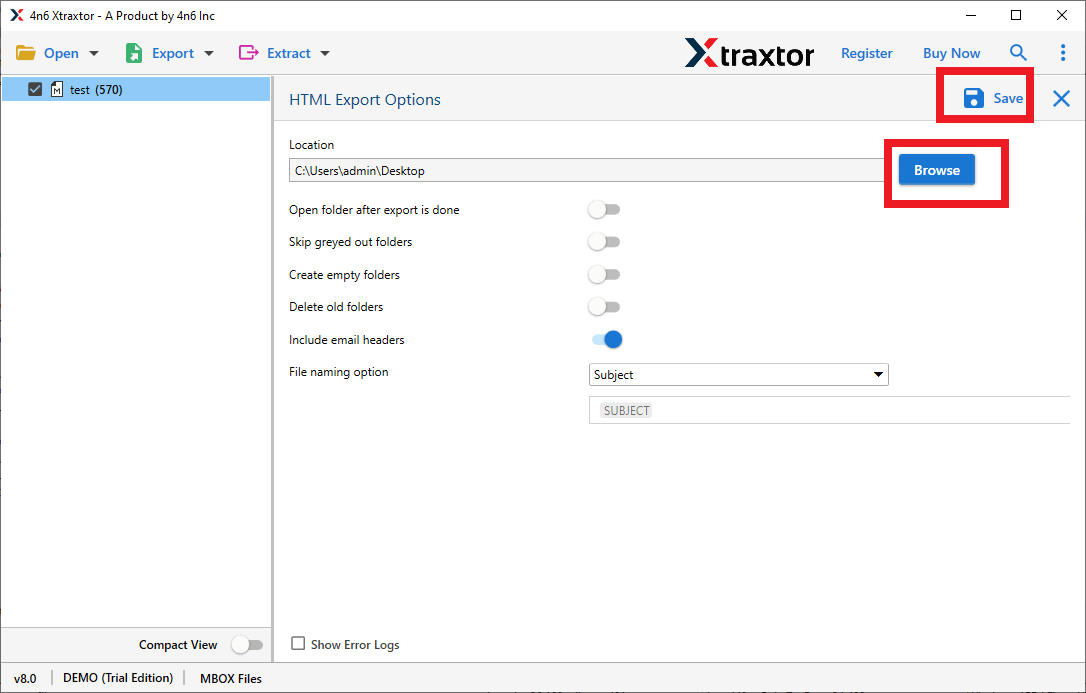
Done! The process is completed, and your Outlook emails are successfully exported to HTML format with all attachments and details intact.
Helpful Benefits of the Best Outlook Email to HTML Converter
- Provides advanced filter options to export emails by date, subject, sender, or receiver.
- Supports all versions of Microsoft Outlook including 2021, 2019, 2016, and earlier.
- No need to install Outlook, as it works directly with PST files.
- Allows bulk conversion of single or multiple PST files without any size limitation.
- Maintains original email formatting, metadata, and folder structure.
- Also, export Outlook emails to PDF, EML, MSG, HTML, etc.
- Preserves attachments along with emails during conversion.
- Offers multiple file naming options for better file management.
- Compatible with all types of Windows operating systems.
- Displays a live progress report during the conversion process.
- Supports selective folder export from large Outlook data files.
- Ensures 100% data security and accuracy during conversion.
Final Words
In this blog, we discussed different methods to export Outlook emails to HTML format. Manual methods are useful for small tasks, but they are not suitable for bulk conversion. For a safe and quick process, using a professional tool is always recommended. It helps you export Outlook emails to HTML without losing any data.
Now, you can easily choose the method that fits your needs and convert your Outlook emails without any trouble.
