
Roundcube is a popular webmail client used by many hosting providers. It is simple, fast, and works well for daily email use. However, problems start when users want to export all Roundcube emails at once.
Many users discover that Roundcube allows exporting emails one by one. This becomes a serious issue if you have hundreds or thousands of emails and want to move to another email service like Microsoft 365, Outlook, or Gmail.
If you are facing the same issue, this blog is for you. Here, we will explain:
- Why is bulk export difficult in Roundcube
- What manual options are available
- Real user problems from the community
- The best way to export Roundcube emails in bulk
Why Users Want to Export All Emails from Roundcube?
A Real User Problem (From the Community)
This issue is not theoretical. Real users face it every day.
A Roundcube user shared their frustration in a self-hosting community. They explained that:
- Their Roundcube account was set up years ago
- They were now moving to a Microsoft business license
- They discovered that emails can only be exported individually
- They had thousands of emails, making manual export impossible
This screenshot clearly shows a genuine and common problem. Many Roundcube users reach this stage and realize that exporting emails one by one is not practical.
If you are feeling the same frustration, you are not alone.
Can You Download all Emails from Roundcube Manually?
Yes, but with limitations and only in EML file format. Using this method, you can export only one email at a time. Hence, it takes a lot of time if you have multiple emails in your mailbox.
Follow the given steps to save emails from Roundcube.
Step 1. Firstly, open your Roundcube Webmail account on your local system.
Step 2. Now, go to Mail Folders and click on emails.
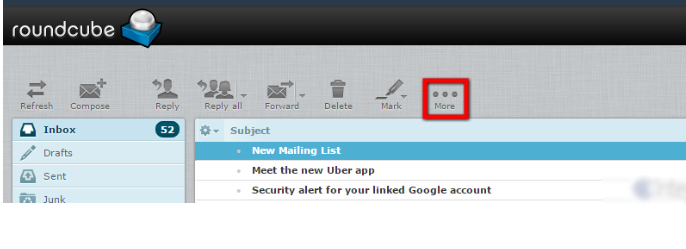
Step 3. After that, click on the More button from top menu.
Step 4. Now, Choose Export option to download emails.
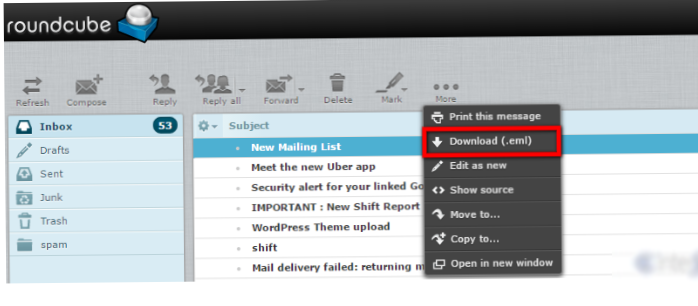
Step 5. At last, click on the Save button to save the exported email.
Step 6. Repeat these steps again and again to export all Roundcube emails.
So, emails are saved in EML format. Go to the destination location and check the downloaded data.
Limitations of the Manual Method
- No option to export all emails at once
- Very time-consuming
- Not suitable for large mailboxes
- High risk of missing emails
- Folder-by-folder effort required
This method works only if you have very few emails.
How to Export All Mail from Roundcube Automatically?
In the above section, we saw that the manual procedure downloads emails in only EML format. However, if you want to save emails in multiple formats and on any email service provider’s platform, then use Xtraxtor Email Backup Tool. The software is a perfect way to export all Roundcube emails at once. It is the most efficient tool that allows you to download your Roundcube emails to different file formats.
You can download the demo version of this utility to check its work efficiency.

Steps to Export All Roundcube Emails
Step 1. Launch Xtraxtor Email Backup Tool on your Windows PC.
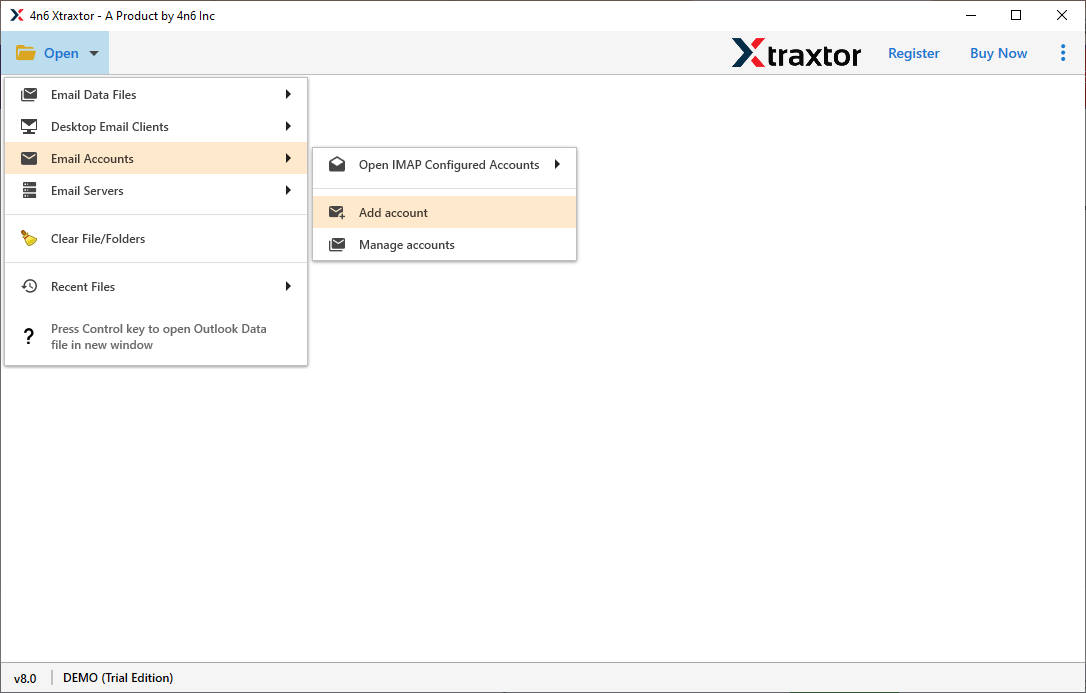
Step 2. Now, Click on Open >> Email Accounts >> Add Account.
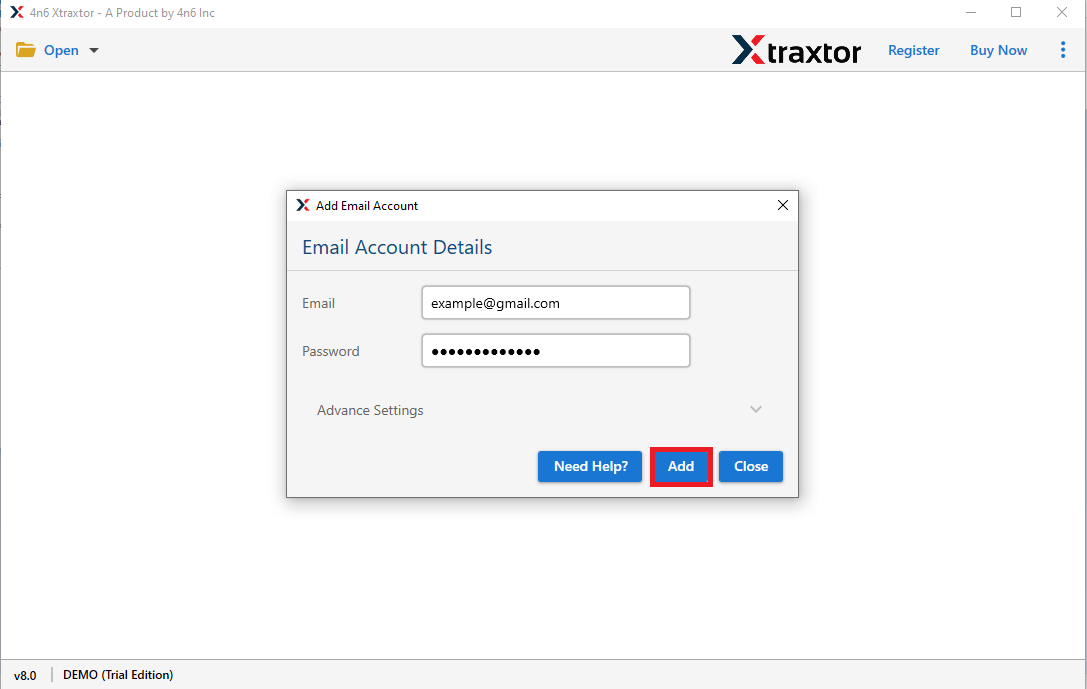
Step 3. Enter your Roundcube credentials and click on Add button.
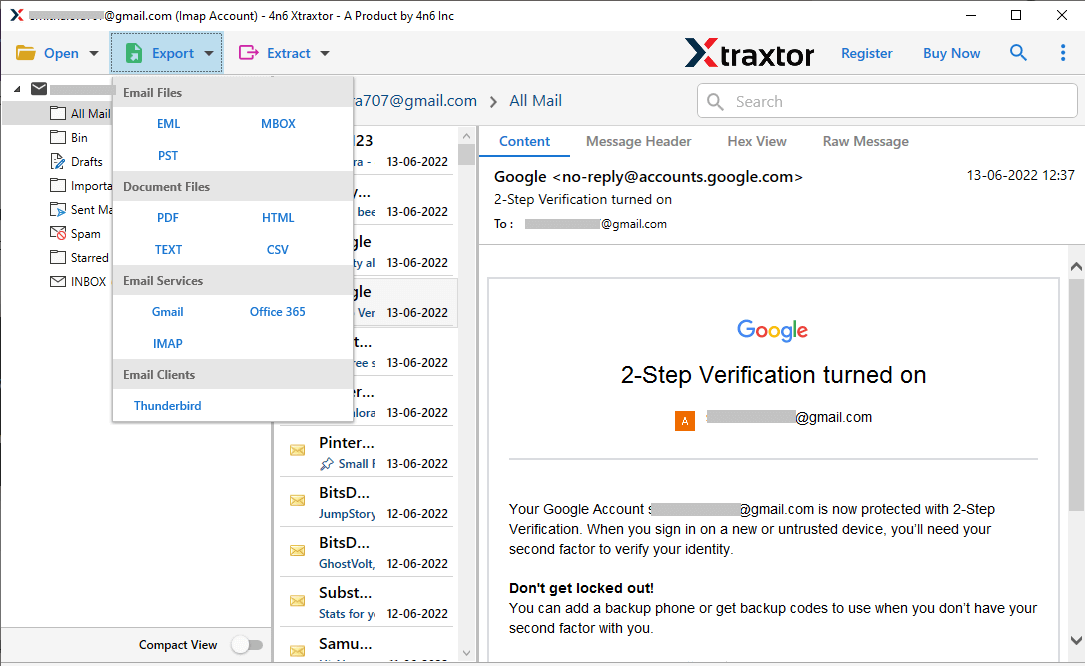
Step 4. After that, click on Export and then select any given options to save the exported emails.
Step 5. At last, click on Browse to set the destination location and press the Save button.
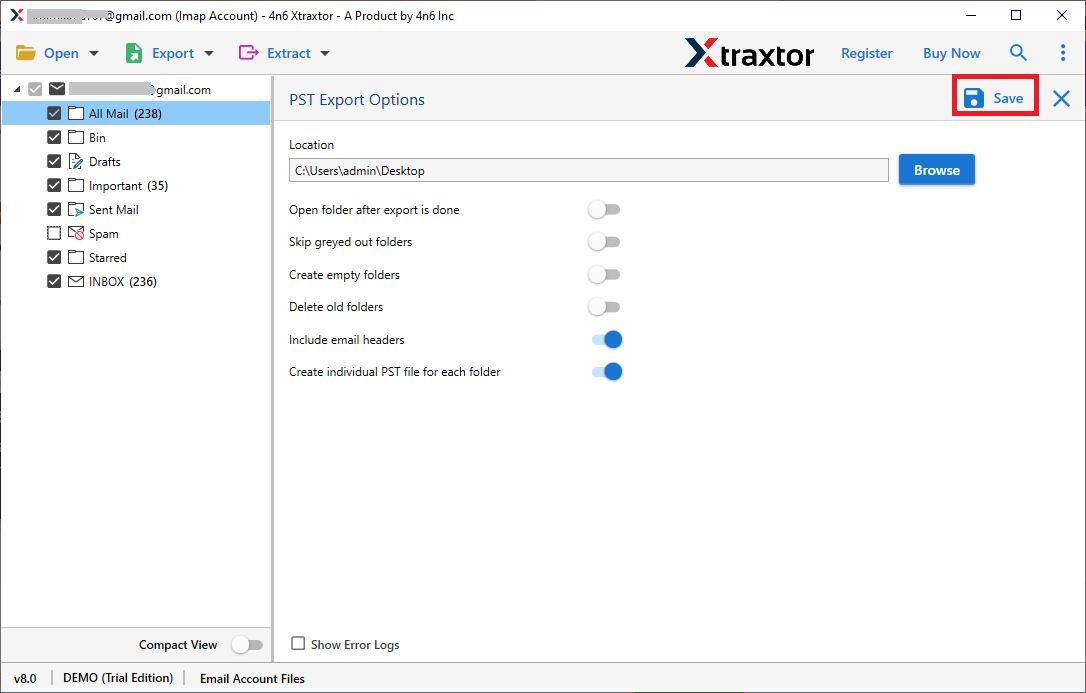
The process is complete. Hence, you can easily migrate emails from Roundcube in a few simple clicks.
Key Features Of Xtraxtor Email Backup Tool
The software has many benefits that help you to easily export all Roundcube emails, which are given below-
- Multiple Saving Options- The tool offers various saving options to save exported data. Using this tool, you can export Roundcube emails to PST, OST, MBOX, EML, MSG, etc. It allows you to secure your mailbox data in a local storage device.
- Bulk Exporting- The software easily downloads emails from Roundcube in a few simple clicks. It is able to export all Roundcube emails at once without losing any data.
- Maintains Folder Hierarchy- The software does not modify the structure and format of emails during the exporting process. It also maintains metadata properties and attributes of the emails
- 100% Data Integrity- The Xtraxtor Email Backup Tool will securely and accurately export all Roundcube emails without any data loss. It provides 100% accurate results after the process.
- Search & Filter Options- If there are a lot of emails in your Roundcube account, but you want to save only some emails, then the tool offers you an option for selective data.
- Directly Archive Emails from any Webmail Account- The Email Backup Tool directly downloads emails from the mailbox. You just need to add your Webmail account and select the saving option. With the help of this tool, you can backup Yahoo, Gmail, Zoho Mail, Yandex, and other Webmail accounts.
- Desired Saving Location- The tool allows you to save the exported data at your desired location. So that you can easily access them for further use.
- Easy to Use- The interface of this utility is very simple and easy to use. Any novice user can perform the process without any external guidance. You can run the software on any version of Windows Operating Systems. It supports all the latest and older versions of Windows OS.
Conclusion
Exporting Roundcube emails in bulk is a real challenge, as clearly shown by real user experiences like the one shared in the screenshot in this article. Roundcube simply does not provide the tools needed for large-scale email export.
If you have only a few emails, the manual method may work. But if you have hundreds or thousands of emails, a professional solution is the only practical and safe option.
The key takeaway is simple:
Do not risk your important emails by exporting them one by one.
Choose a method that saves time, protects your data, and gives you peace of mind.
