Are you planning to move from Spicebird email client to Microsoft Outlook? If yes, then you may face one common problem: how to convert Spicebird mailbox to PST. This issue happens because Spicebird and Outlook use different email file formats.
Spicebird stores emails in a format that Outlook cannot open directly. That is why you cannot simply drag and drop Spicebird folders into Outlook. To solve this problem, you need to convert Spicebird mailbox data into PST format, which is supported by Outlook.
In this easy guide, we will explain simple and effective ways to export Spicebird to PST, either by using a free method or with the help of a professional solution.
How to Convert Spicebird Mailbox to PST File?
Spicebird stores its data, which has no extension. It has no direct export facility. So, to export Spicebird to PST, first of all, you have to locate the file location of Spicebird mailbox data.
C:\Documents and Settings\Administrator\Application Data\spicebird’
Copy this path to export Spicebird mailbox and then convert the extracted Spicebird MBOX file to PST. Hence, the method works in two phases to export Spicebird email to PST file.
Step 1. Locate Spicebird Mailbox Data
- Open the Spicebird email client and click Local Folders.
- Now, click on View Settings for this account option.
- After that, copy the Local directory path.
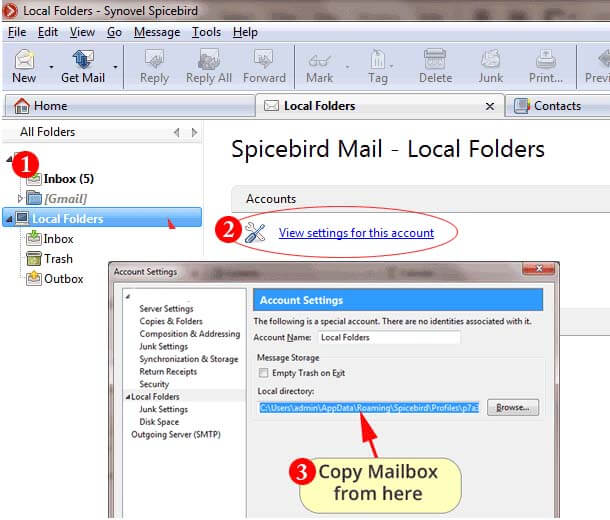
- Paste the copied location into your Computer browser’s window.
Here, you will get two types of file. One with .msf extension and the second one without any extension. The file without an extension is Spicebird Data file. Click on it and rename .mbox extension.
Step 2. Export Spicebird Email to PST File
Use Xtraxtor MBOX to PST Converter on your Windows system to convert Spicebird to PST file. The software export extracted Spicebird MBOX file to PST format in a few simple clicks. It convert all data from Spicebird mailbox to PST at once. It provides many advanced filter options to export selected emails from Spicebird mailbox. This is an all-in-one solution that can easily convert Spicebird email to PST in bulk.
Moreover, using this utility, you can export Spicebird mailbox into various file formats, such as converting MBOX to PDF, HTML, EML, MSG, etc. The user-friendly interface helps beginners to export Spicebird to PST file without any complications.
You can download its free demo version to check its work performance.


Follow the Given Steps to Convert Spicebird Email to PST File
- Download and Run Xtraxtor MBOX Converter on your Windows PC
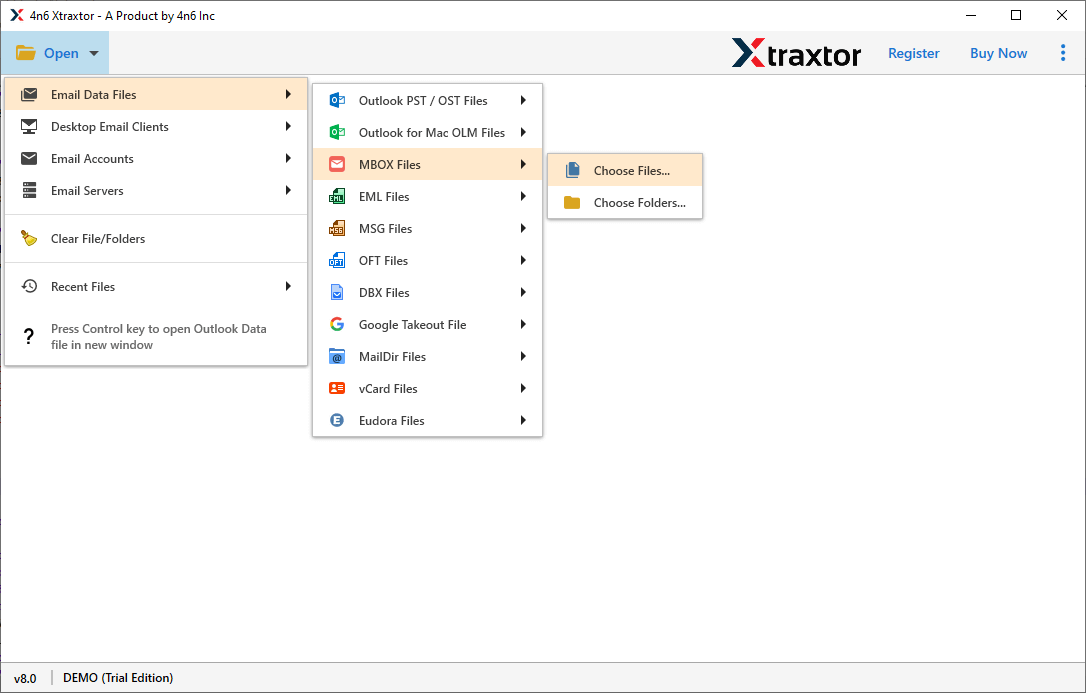
- Now, Click on Open >> Email Data Files >> MBOX Files >> Choose Spicebird MBOX file.
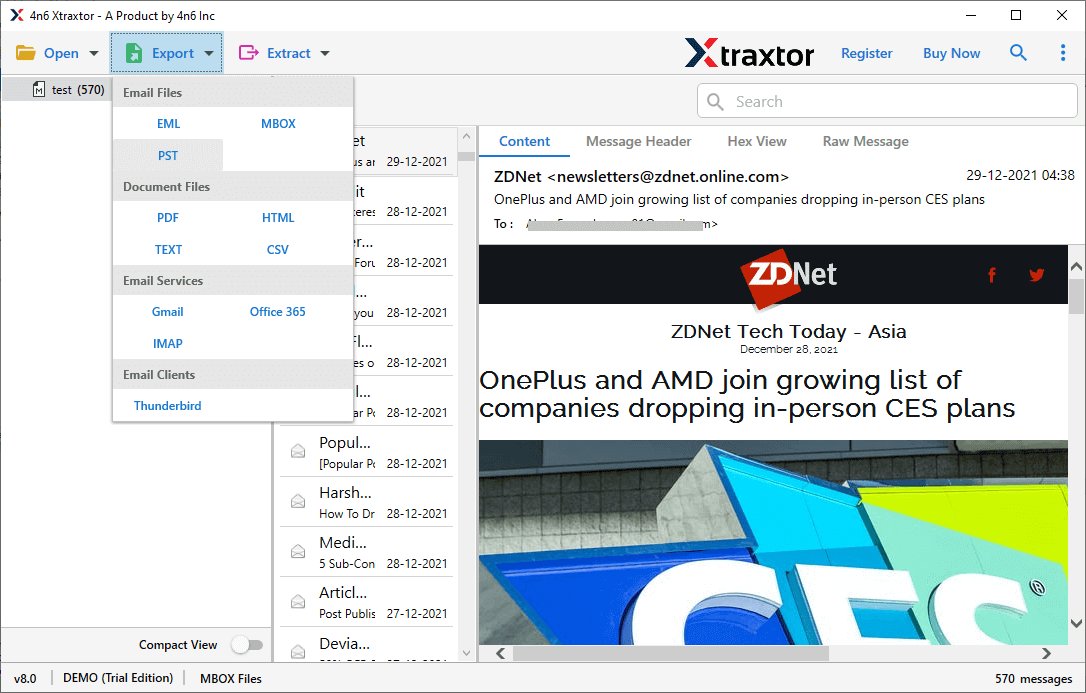
- After that, Click on Export and Select PST from given option.
- Click on Browse to set the Destination Location and then click on Save button to save the resultant files.
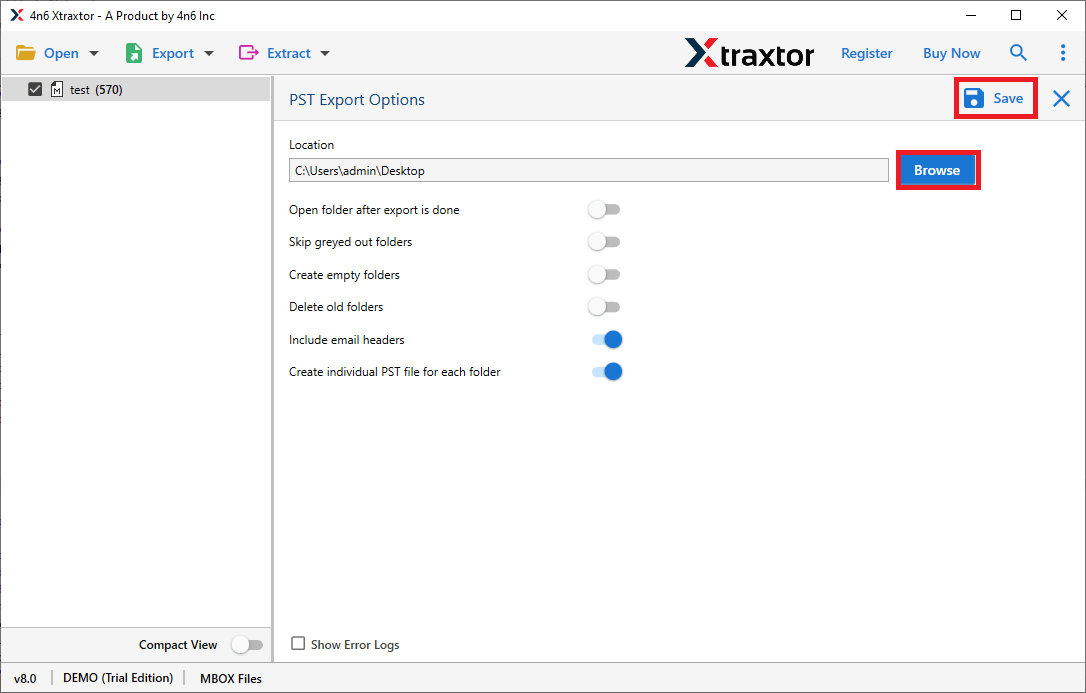
The process is complete. Hence, you can easily convert Spicebird to PST in a simple manner.
Why Use Xtraxtor Software- Know
The software has many benefits that help you to easily export Spicebird to PST file format. Some of them are-
- The software can convert Spicebird mailbox files to various file formats with attachments, metadata properties, attributes etc.
- It preserves complete data integrity and gives accurate results after the conversion process. It also keeps the original structure of Spicebird emails throughout the conversion.
- The software offers a search option to search any particular data for conversion. It also provides a preview option to view the Spicebird mailbox data before the conversion process.
- Using this utility you can directly import MBOX to Gmail, Office 365, Google Workspace etc. You do not need to purchase other products to complete these types of tasks.
- The user-friendly interface helps to convert Spicebird email to PST file format without any external guidance.
- You can run this tool on any version of the Windows Operating System. It supports all latest and Old versions of Win OS.

Final Words
In this post, we have discussed how to convert Spicebird mailbox to PST file. However, you can see that we can rename .msf to .mbox extension without any hassle. After that, the above-suggested tool can easily export Spicebird to PST file without losing a single bit of data. Download the tool to do it, and if you have any queries related to the software, contact the support team that is available 24*7.