The purpose of this article is to explain how to export Roundcube to PST in a simple and practical way. It helps users understand why Roundcube to PST conversion is needed and guides them in choosing the right method to move emails into Outlook safely and without data loss.
Email migration often becomes a challenge during IT planning, especially when businesses use Roundcube webmail for daily communication. Roundcube is easy to use and works well for many organizations, but problems arise when users need to move their emails into Microsoft Outlook.
Outlook does not support Roundcube mailboxes directly. It only works with PST (Personal Storage Table) files. Because of this limitation, exporting Roundcube emails to PST becomes a necessary but sometimes difficult task.
How to Convert Roundcube Emails to PST Files Using Outlook
In this method, you need to install MS Outlook on your system to export Roundcube to PST files. This method is free of cost, but there is a higher chance of data loss. The configuration process is complicated, so non-technical users face difficulty downloading emails.
Follow the given steps-
Step 1. Firstly, Launch MS Outlook on your Windows system.
Step 2. Now, click the Add Account option from the main menu.
Step 3. Then, enter Roundcube login credentials and IMAP details to sign in.
Step 4. Press the Finish button. Outlook will load all email folders from Roundcube in a few minutes.
Step 5. Now, go to the Open/Export and choose the Import/Export option.
Step 6. After that, click on Export to a file as PST and select email folders.
Step 7. Finally, click on the Finish button to save Roundcube emails in PST format.
Challenges:
- Time-consuming syncing
- Outlook dependency
- No selective export control
- High risk with large mailboxes
How to Export All Emails from Roundcube to PST Files?
As we know, the manual approach is complicated and a time-consuming process. So, we use a professional method to export Roundcube to PST file format. However, Xtraxtor Email Backup Tool is a reliable solution to save all Roundcube emails to PST files at once. The software preserves 100% data integrity during the exporting process. It provides multiple filter options to transfer any specific emails from Roundcube. Moreover, it offers a preview option before the process.
Besides this, the simplified interface of this utility helps beginners to export Roundcube to PST files without any complications. You can run this tool on any version of Windows Operating Systems.
The software has a demo version that helps you to check how it works so easily.

Steps to Export Roundcube to PST Files
Step 1. Firstly, launch the software on your Windows PC.
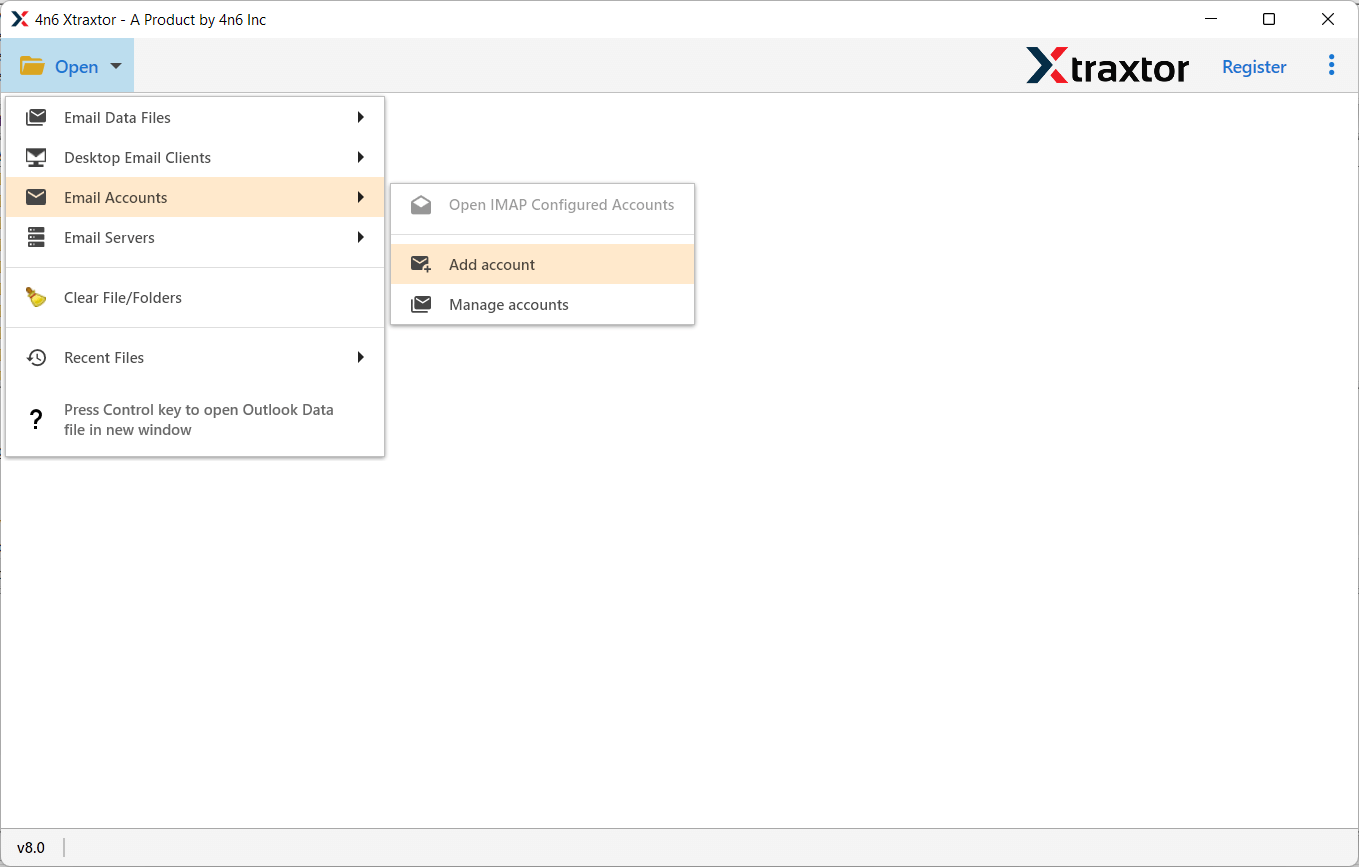
Step 2. Now, click on Open >> Email Accounts >> Add Account.
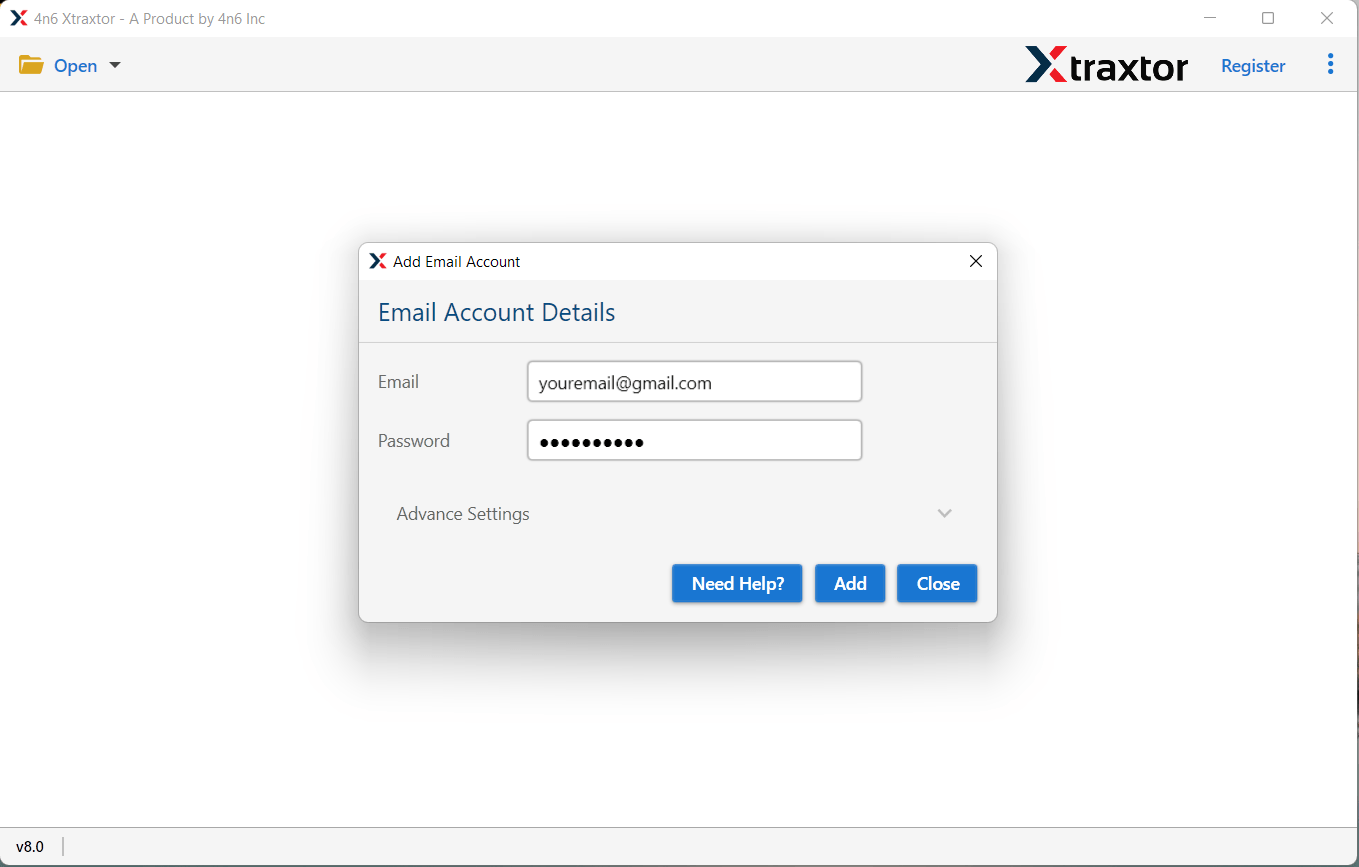
Step 3. Then, enter your Roundcube account credentials and click on the Add button.
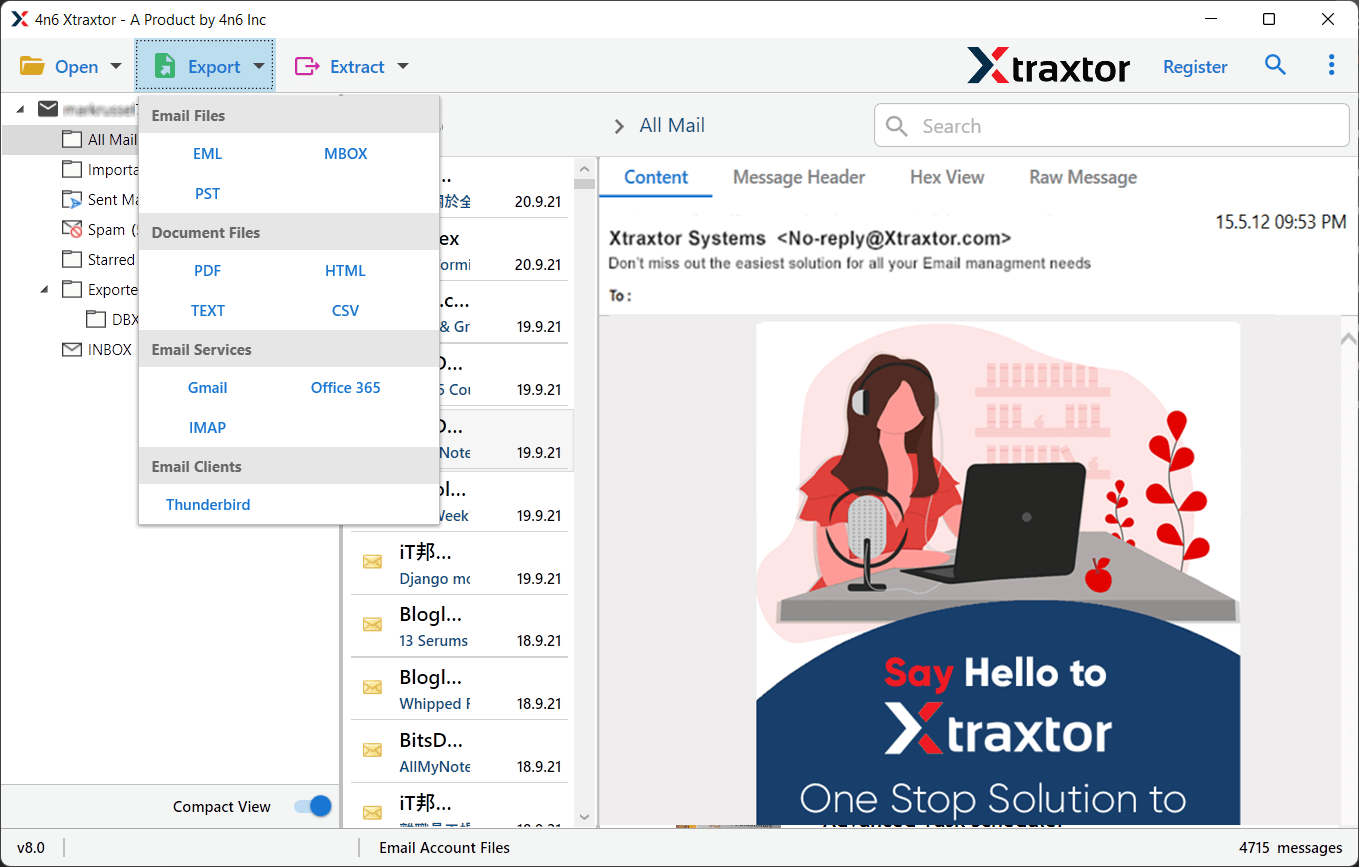
Step 4. After that, click on Export and Select PST from Email Files option.
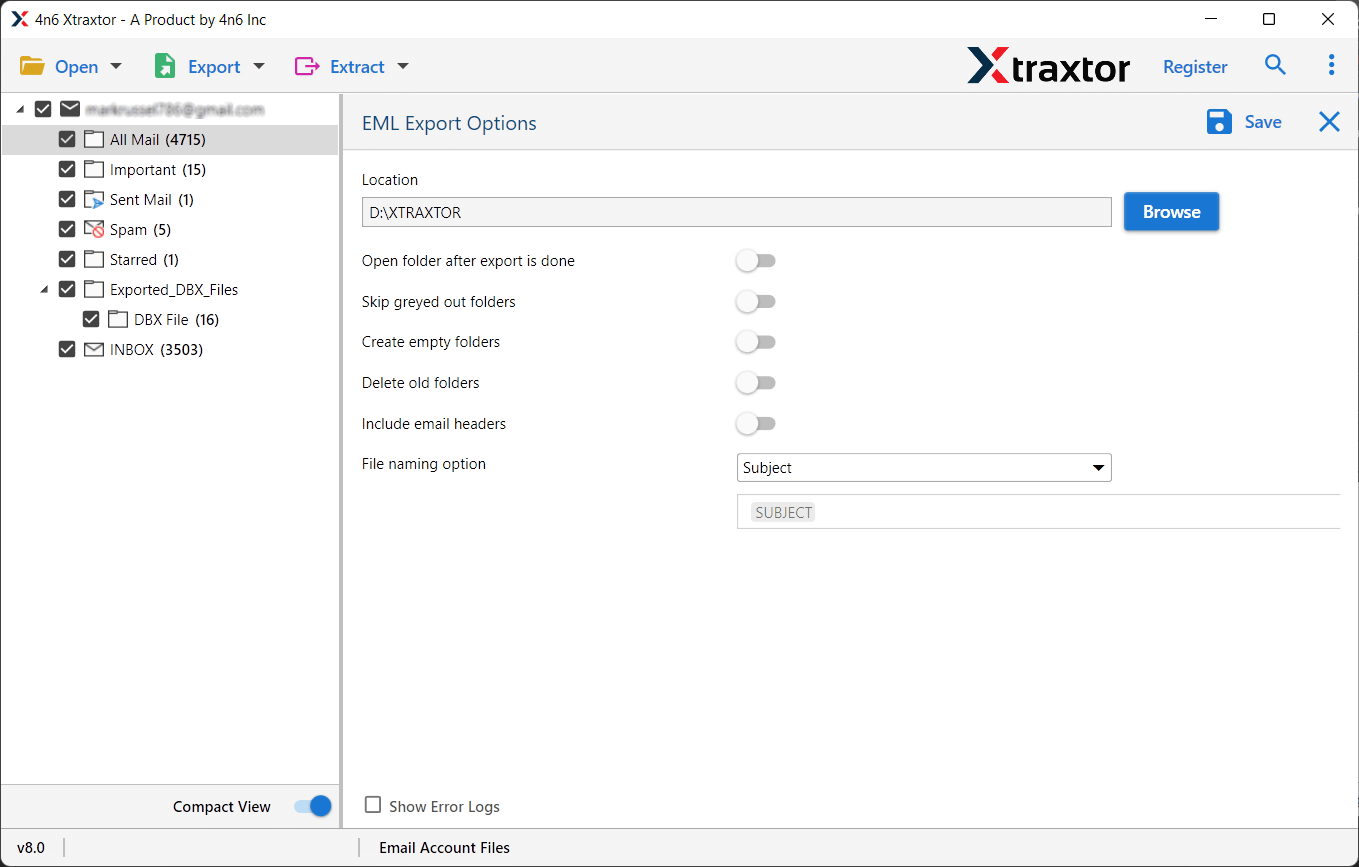
Step 5. At last, click on Browse to set the destination location and press the Save button.
Why Use an Email Backup Tool?
The software has many benefits that help you to easily export Roundcube to PST files, which are given below-
- Export All Roundcube Emails: The software easily downloads emails in a few simple clicks. It is able to export all Roundcube emails to PST files at once without losing any data.
- Multiple Filter Options: This Email Backup Tool provides various advanced filter options, such as to, from, date, time, subject, etc. If you do not want to export unnecessary emails from Roundcube then filters help you to select desired data.
- Directly Save Email from any Webmail Account: The Email Backup Tool directly downloads emails from Webmail accounts. You just need to add your Webmail account and then select the saving option. With the help of this tool, you can backup Gmail, Yahoo, Zoho Mail, Yandex, and other Webmail accounts.
- Export into Various File Formats: The tool offers various saving options to save exported data. You can export emails to PST, OST, PDF, MBOX, EML, MSG, etc. It allows you to secure your mailbox data in a local storage device.
- Preserves Data Integrity: The Xtraxtor Tool will securely and accurately export Roundcube to PST files without any data loss. It provides 100% accurate results after the process.
- Save at Desired Location: The tool allows you to save the output data at your desired location. So that you can easily access them for further use.
- Maintains Original Structure: The software transfers Roundcube emails without modifying the structure and formats of the emails. It maintains metadata properties and attributes of the emails during the process. It does not change the folder and sub-folder hierarchy.
- Save Emails from multiple Webmail Accounts: This is an all-in-one solution to save emails from any Webmail accounts. Using this tool, you can take backup Zoho Mail, Gmail, Yahoo, Google Workspace, etc.
- Export Emails to Another Webmail Account: If you move from one email platform to another, and want to transfer your mailbox data. This tool is very helpful for you. You can migrate Gmail to Yahoo, Office 365, Zoho Mail, and other IMAP email clients.
- Dedicated Customer Service: The best thing about this tool is that the customer service team is available 24/7 to answer users’ questions. If you have any doubts related to the product, then you can contact the support team. They solve your problem as soon as possible.
Conclusion
In this post, we have discussed the two techniques to export Roundcube to PST files. You can manually transfer Roundcube emails to Outlook PST, but it requires some technical steps. So, experts recommend using an alternative solution to easily complete this task. However, the above suggested tool can export all Roundcube emails at once with complete accuracy.