Do you want to export GoDaddy emails to MBOX file format? If yes, this guide will help you do it safely and easily, without losing emails or attachments.
GoDaddy is a popular domain registrar and hosting provider that also offers professional email hosting. While GoDaddy email works well online, many users want to create a local backup, switch email clients, or access emails offline. For these purposes, exporting emails to MBOX format is a practical solution.
In this article, you’ll learn why users export GoDaddy emails to MBOX and how to do it step by step using a reliable method.
Why Export GoDaddy Emails to MBOX File?
Exporting GoDaddy emails to MBOX can be useful in many real-life situations. Here are the most common reasons:
- Easy migration to other email clients: MBOX is supported by Thunderbird, Apple Mail, SeaMonkey, and other popular clients.
- Secure email backup: Saving emails as MBOX allows you to keep a local copy of important messages and attachments.
- Offline email access: MBOX files can be opened without an internet connection using compatible email applications.
- Simple email management: MBOX stores multiple emails in a single file, making data storage and organization easier.
Because GoDaddy does not provide a built-in option to export emails to MBOX, users often look for alternative solutions.
How to Convert GoDaddy Emails to MBOX Automatically?
Download and run Xtraxtor Email Backup Tool on your Windows PC to save GoDaddy emails as MBOX file in a few simple clicks. It is a 100% safe and secure program to directly convert GoDaddy emails to MBOX file. The software is able to export GoDaddy email folders to MBOX in bulk. It maintains the folder hierarchy during the conversion process. The tool has an email filtration feature that helps you to export specific emails from GoDaddy to MBOX.
In addition, the tool not only export Godaddy emails to MBOX but also convert emails in multiple file formats such as PST, EML, PDF, MSG, TXT, HTML, etc. The user-friendly interface helps beginners to complete the exporting process without any technical guidance.
Download its free demo version and perform GoDaddy to MBOX conversion in a simple manner.


Steps to Export GoDaddy Emails to MBOX File
Step 1. Launch Xtraxtor GoDaddy to MBOX Converter on your Windows system.
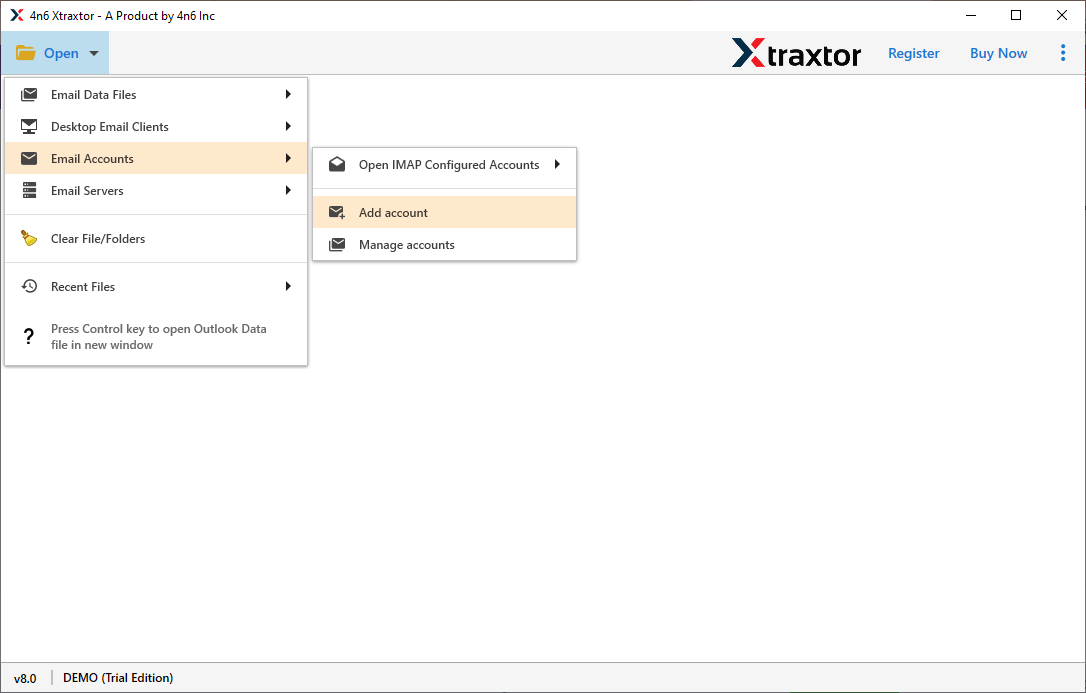
Step 2. Now, click on Open >> Email Accounts >> Add Account.
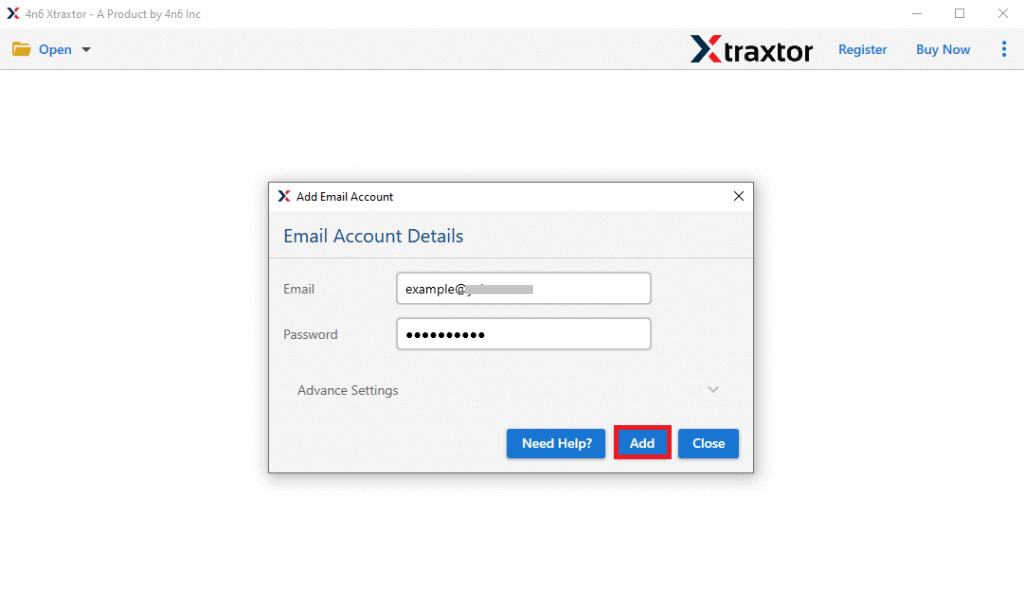
Step 3. Enter the login details of Godaddy webmail account in the respective field and press the Add button.
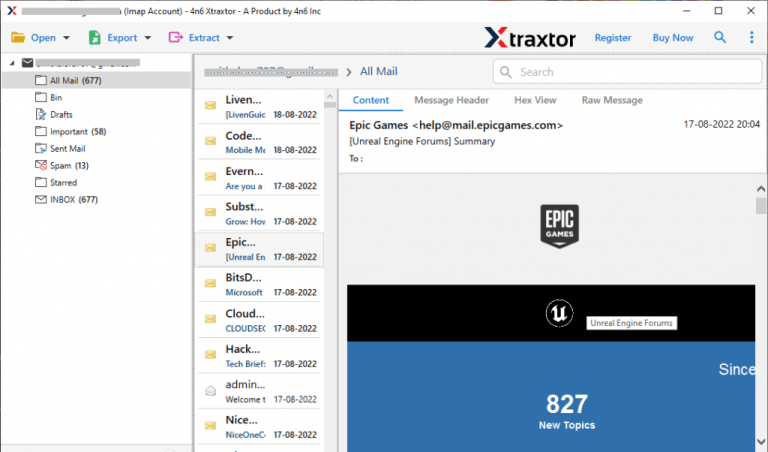
Step 4. Here, you can view GoDaddy emails before saving them to MBOX.
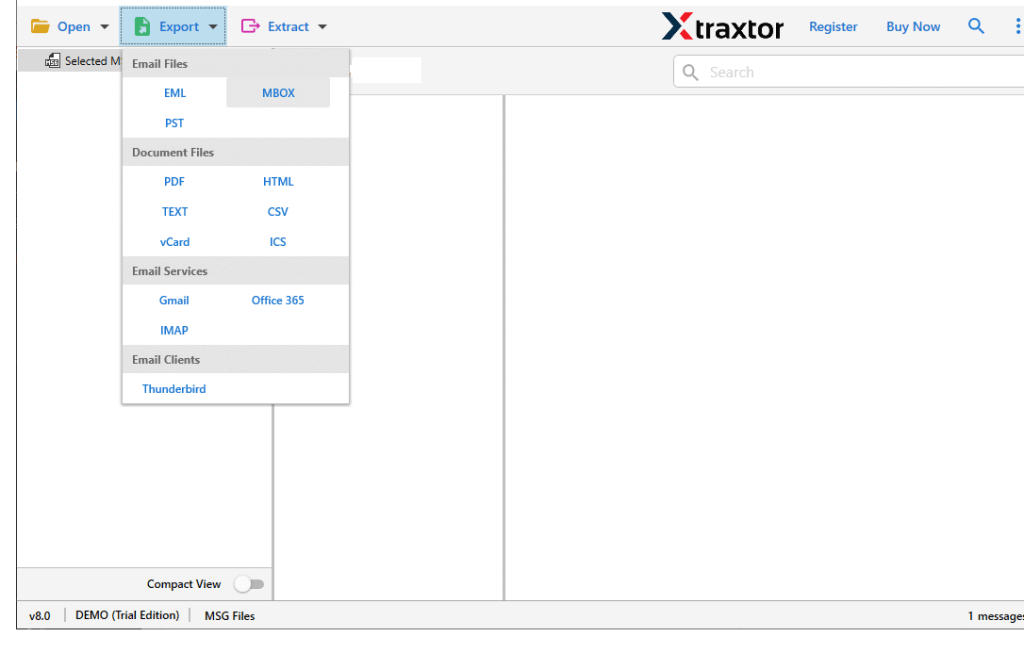
Step 5. After that, go to Export and select MBOX from the given options.
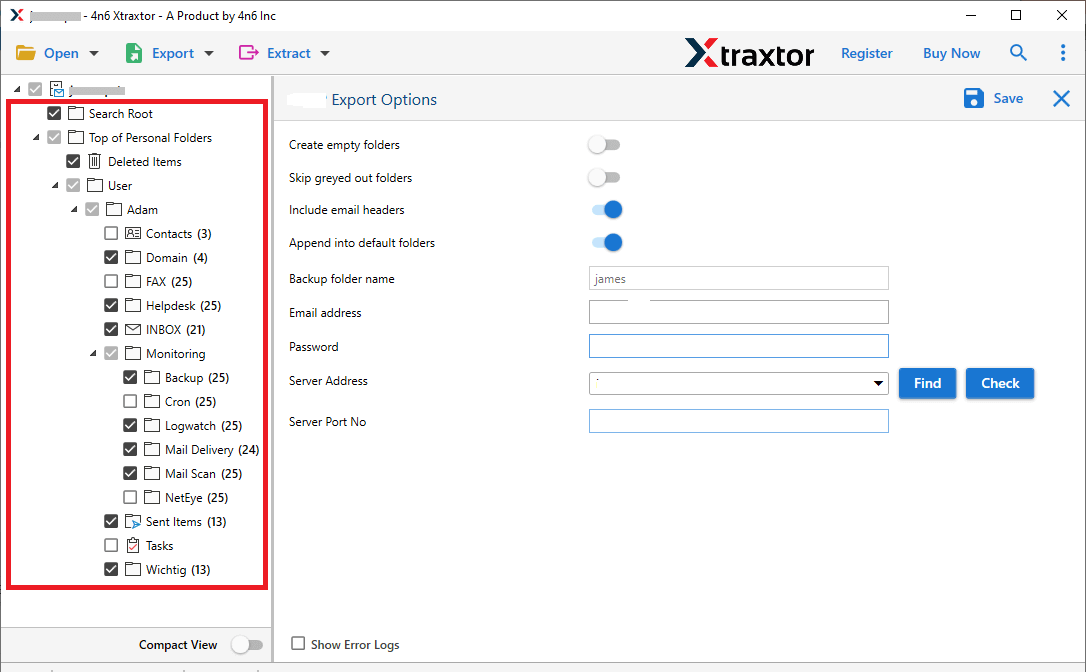
Step 6. Choose Godaddy mailbox folders that you want to export into MBOX.
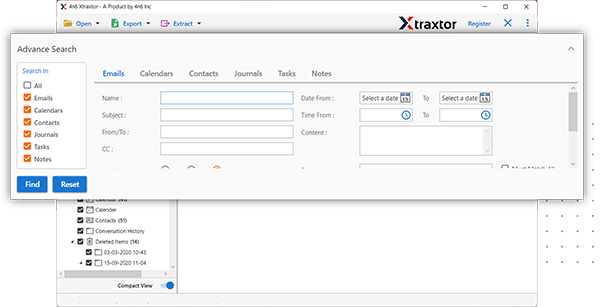
Step 7. Apply the filters to save selected emails.
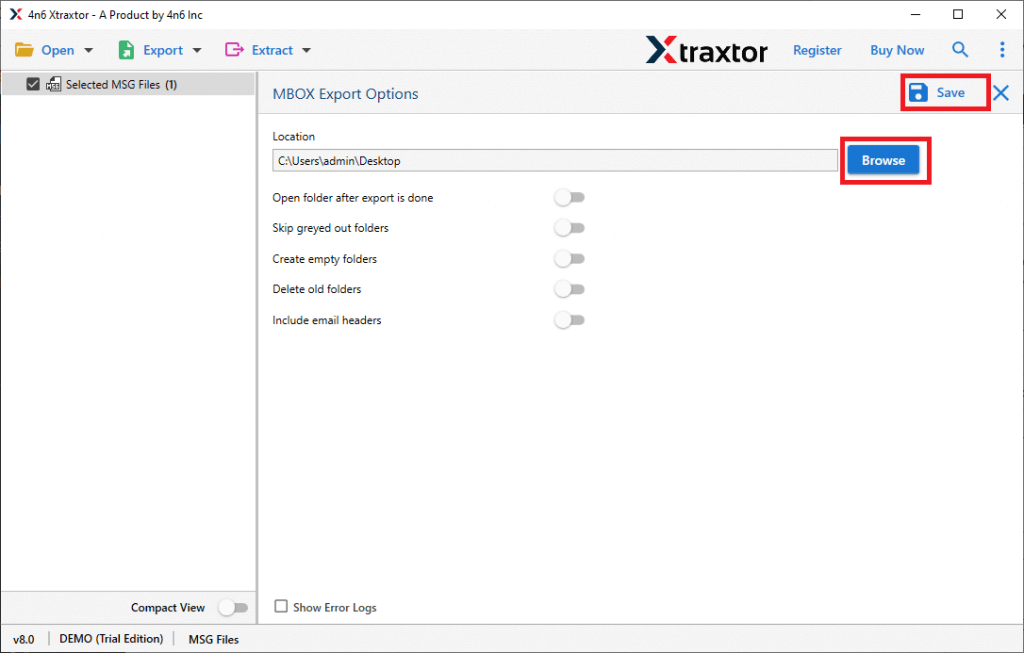
Step 8. Browse the location to save the exported file and then hit the Save button.
Done! Hence, you can easily export Godaddy emails to MBOX file without any hassle.
Highlighted Features of Xtraxtor Godaddy to MBOX Converter
The software has many advanced features which are given below-
- Direct Conversion: In this utility, you do not need to install any external applications to save Godaddy emails as MBOX file. Just enter the login credentials of the Godaddy account and select the MBOX format. Hence, it completes the process in a few seconds.
- Bulk Conversion: The software is able to export all Godaddy emails to MBOX at once. There are no limitations on the number and size of emails. It save unlimited emails with full accuracy.
- Keep Email Structure: This tool is programmed in such a manner that identifies the email folder hierarchy and preserves it even after the exporting process. It saves Godaddy emails in their original structure without any single change.
- Advanced Email Filter Options: The software provides multiple email filter options such as Date Range, Sender and Receiver details, Subject Name, etc. to export specific email and remove the rest of them.
- Migrate Godaddy to Various Email Accounts: With this utility, you can transfer your emails to targeted email service providers. You can directly migrate Godaddy email to Gmail, Office 365, Yahoo Mail, Thunderbird, Zoho Mail, AOL Mail, and many other email accounts.
- Wide Compatibility: It is a completely Windows-based utility which means you can run this application on any Windows Based system including Win 11.
- Free Trial Version: The software has a free demo version to check its work efficiency and accuracy before purchasing the licensed version. The customer support team is available 24*7. If you have any doubts related to the product contact them. They solve your problem as soon as possible.
Frequently Asked Question
Q1. Does your software allow to export Godaddy emails to MBOX with all email attributes?
Ans- Yes, the software preserves complete email items during GoDaddy to MBOX conversion.
Q2. Is it possible to export GoDaddy email folders to MBOX between a financial year?
Ans- Yes, with an advanced date filter, you can save GoDaddy emails as MBOX file for a financial year.
Q3. Can I use this software to migrate email from GoDaddy to Office 365 account?
Ans- Yes, the software is able to migrate GoDaddy emails to Office 365, and many other email accounts.
Q4. Can I use this application on my Windows 11 64 Bit laptop?
Ans- Yes, this tool is fully compatible with the newly launched Windows 11 as well as all old editions.
Final Words
In this post, we have discussed how to export GoDaddy emails to MBOX file. Here, we have provided you with the most effective and expert solution in detail to save GoDaddy emails in MBOX format. Download Godaddy to MBOX converter and complete this conversion process in a simple manner.